

This translation is community contributed and may not be up to date. We only maintain the English version of the documentation. Read this tutorial in English
Beginner
贪吃蛇
本教程会带您创建一个最常见、也最适合练习复刻的经典游戏。这个游戏有很多变体,本教程中的蛇会吃“食物”,并且只在吃到食物时变长。蛇还会在包含障碍物的游戏场地中爬行。
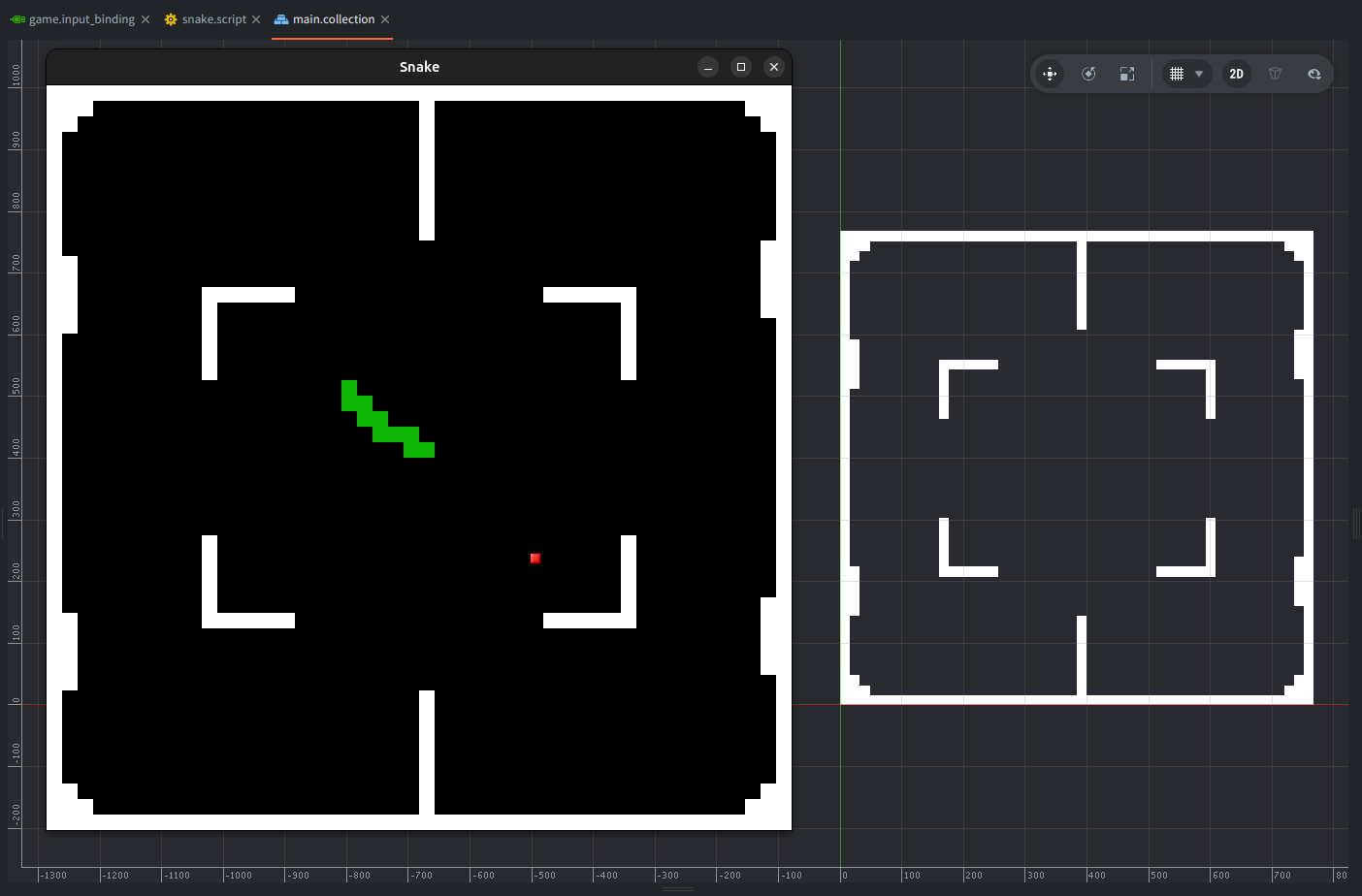
您将学到什么
在本教程中,您将学习如何:
- 在 Defold 中从零创建游戏
- 设置并处理输入
- 创建瓦片地图,并在运行时修改它们
- 使用 Lua 编写脚本
给初学者的说明
本教程面向初学者,但如果您完全没有 Defold 和游戏开发经验,建议先阅读一些入门手册,尤其是关于 Defold 构建块和术语表的内容。如果还没有下载 Defold,请查看安装手册。也建议查看编辑器概览,以便快速熟悉编辑器本身;本教程也会在每一步提供截图。
创建项目
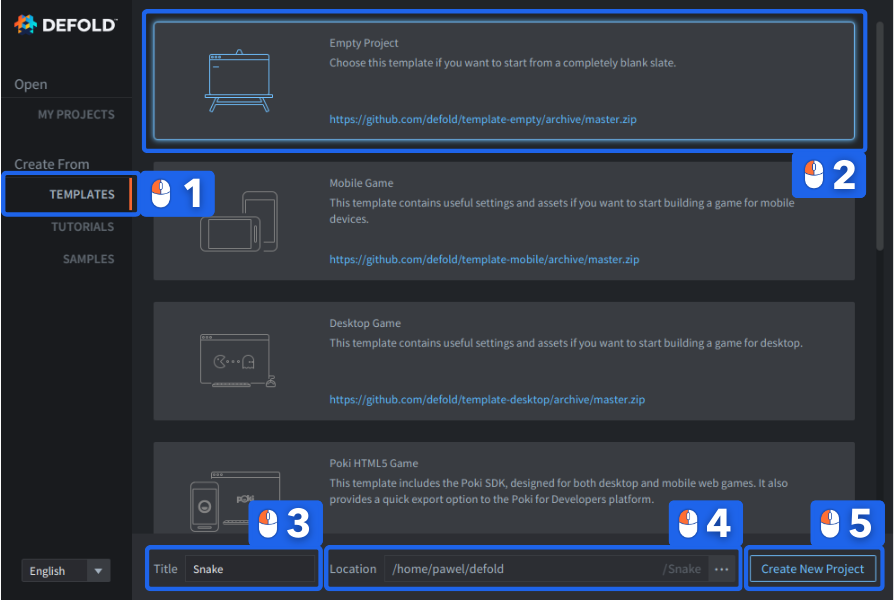
启动 Defold,然后:
- 在左侧选择 Create From ▸ Templates。
- 选择 Empty Project。
- 在 Title 字段输入项目名称。
- 为项目选择 Location。
- 点击 Create New Project。
完成!
项目设置
我们先定义游戏分辨率。
- 编辑器打开后,在左侧 Assets 面板中找到
game.project文件。双击打开。 - 前往
game.project文件的 Display 部分。 - 将游戏尺寸(
Width和Height)设置为 768⨉768,或其他 16 的倍数。
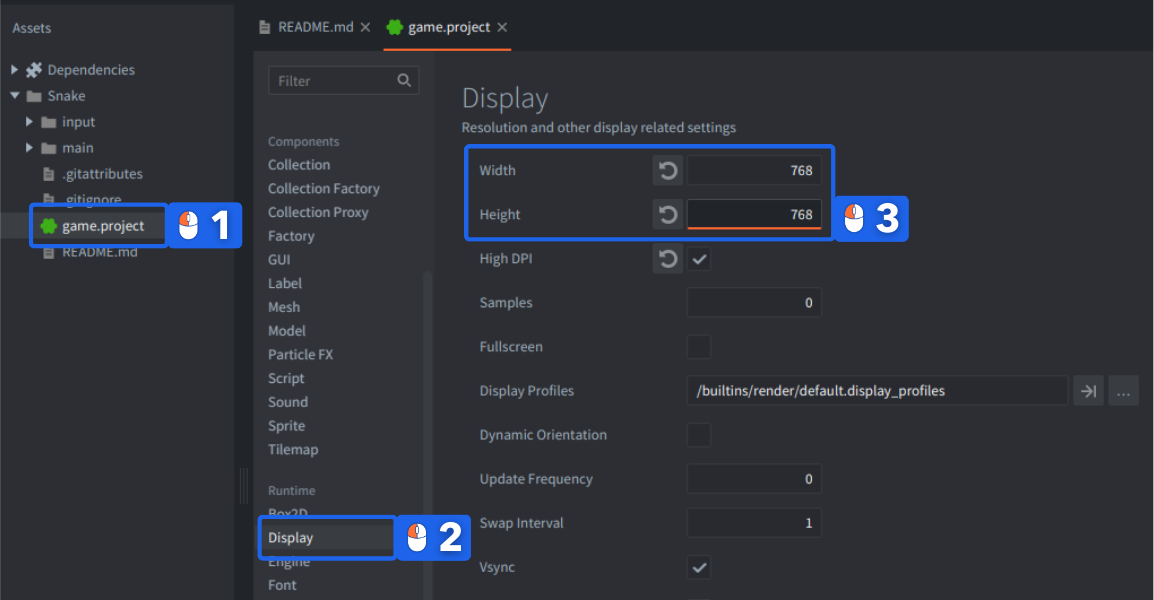
这样做的原因是游戏会绘制在网格上,每个片段都是 16x16 像素,这样游戏画面不会裁掉任何不完整的片段。game.project 文件包含项目的所有重要设置,您可以在项目设置手册中阅读全部说明。
完成!
在 Assets 面板中创建新文件夹
极简贪吃蛇克隆所需的图形很少:一个 16⨉16 的绿色蛇身片段,一个白色障碍物方块,以及一个表示食物的较小红色方块。
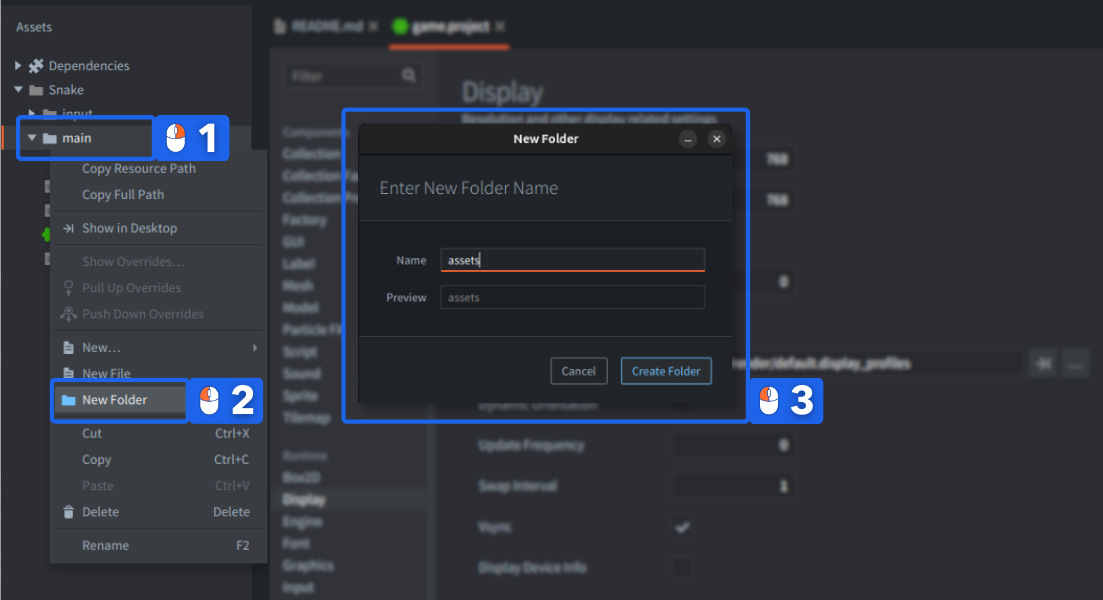
首先,在 Defold Editor 中为资源创建一个目录:
- Right click
main文件夹 - 选择
New Folder。 - 会出现一个要求输入名称的弹窗,输入
assets并点击Create Folder。
完成!
向游戏添加图形
下面这张图片是您唯一需要的资源:

- Right click 上方图片并保存到本地磁盘。然后,将下载的图片拖放(或复制 + 粘贴)到刚才在项目文件夹中创建的新位置。
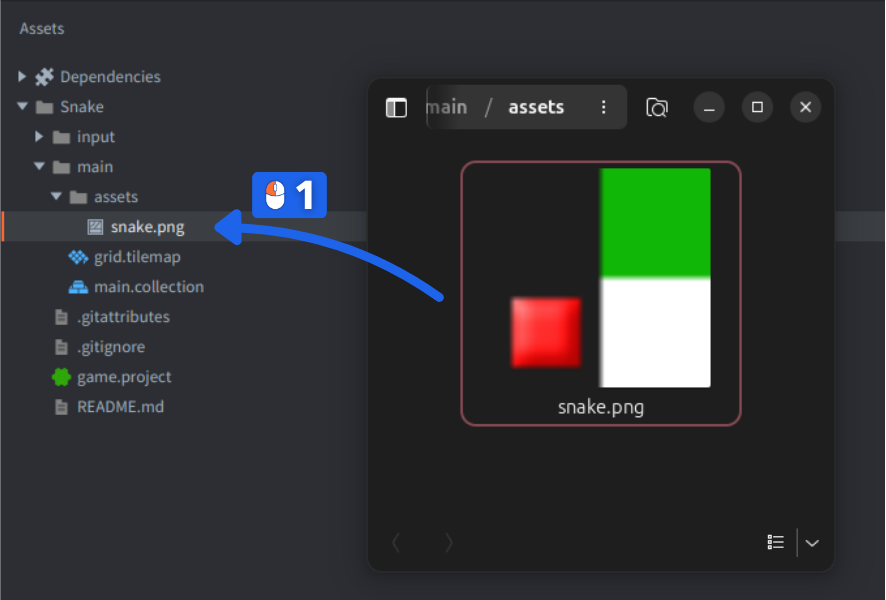
您也可以在这里阅读更多导入资源的细节。
完成!
添加 Tile Source
Defold 提供内置的 Tile Map 组件,您将用它创建由网格中对齐的瓦片组成的游戏场地。瓦片地图允许设置和读取单个瓦片,非常适合这个游戏。由于瓦片地图从 Tile Source 获取图形,因此需要先创建一个:
- Right click
assets文件夹。 - 在 “Resources” 部分选择
New▸Tile Source。 - 将新文件命名为 “snake”(编辑器会将文件保存为
snake.tilesource)。
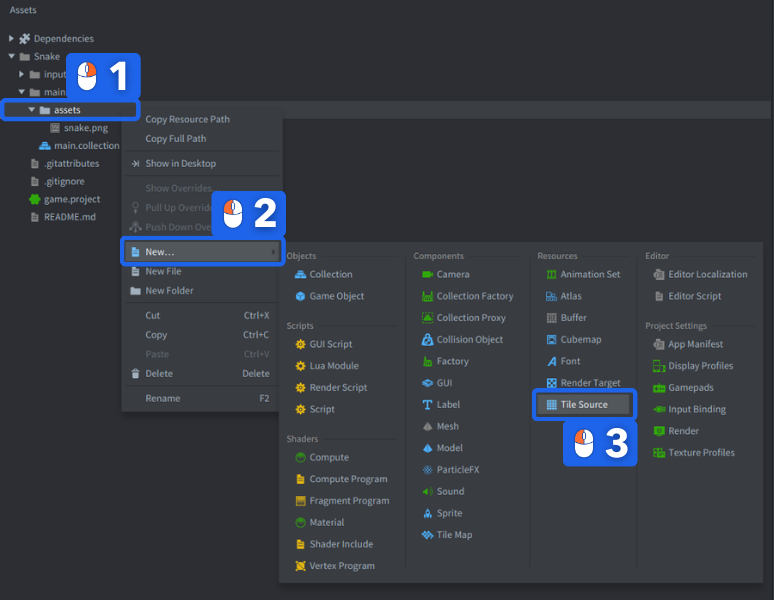
Tile source 会在该文件类型专用的 Tile Source Editor 中打开,并会要求您为它提供一张图片才能使用。在右侧可以找到 Properties 面板:
-
将
Image属性设置为刚刚导入的图形文件。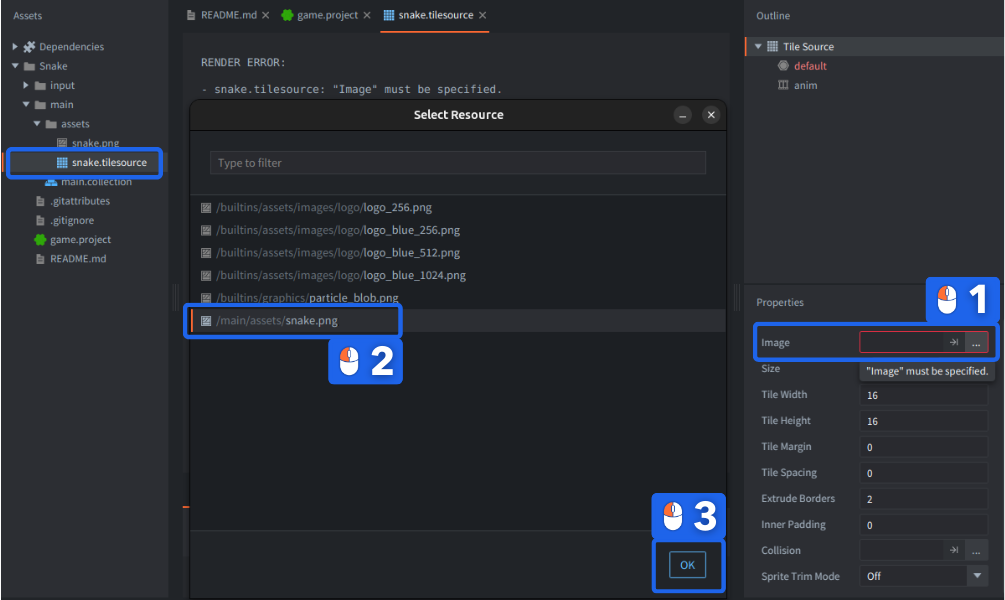
-
Width和Height属性应保持为 16(默认值)。这会将 32⨉32 像素图片拆分为 4 个瓦片,编号为 1–4。
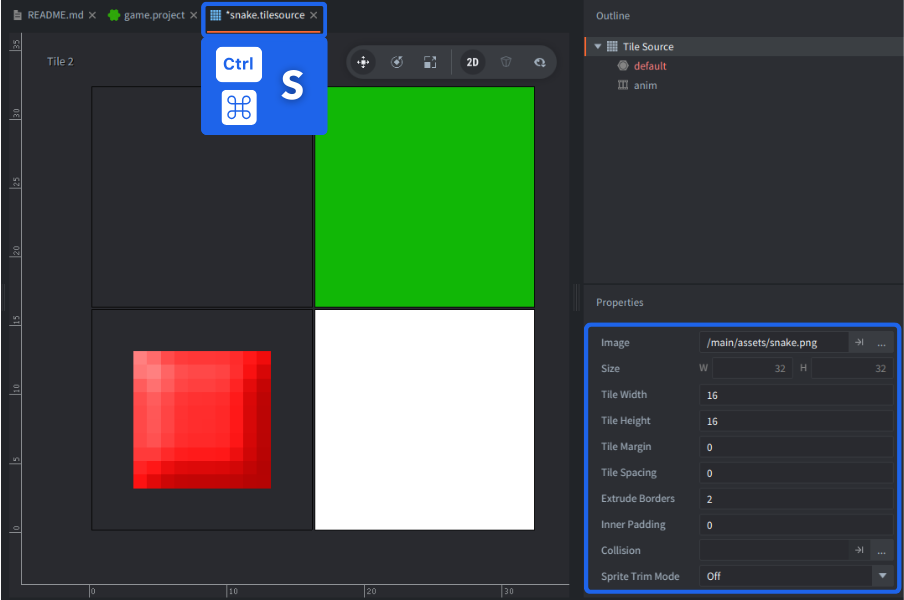
请注意,Extrude Borders 属性设置为 2 像素。这是为了防止图形一直延伸到边缘的瓦片周围出现视觉伪影。
如果您修改了文件,其标签页名称旁边会出现星号 *。选择 File ▸ Save All,或使用快捷键 Ctrl+S(Mac 上为 ⌘Cmd + S)保存所有文件。
完成!
创建游戏场地瓦片地图
现在 Tile Source 已可使用,是时候创建游戏场地的瓦片地图组件了:
-
Right click
main文件夹,并在 “Components” 部分选择 New ▸ Tile Map。将新文件命名为 “grid”(编辑器会将文件保存为 “grid.tilemap”)。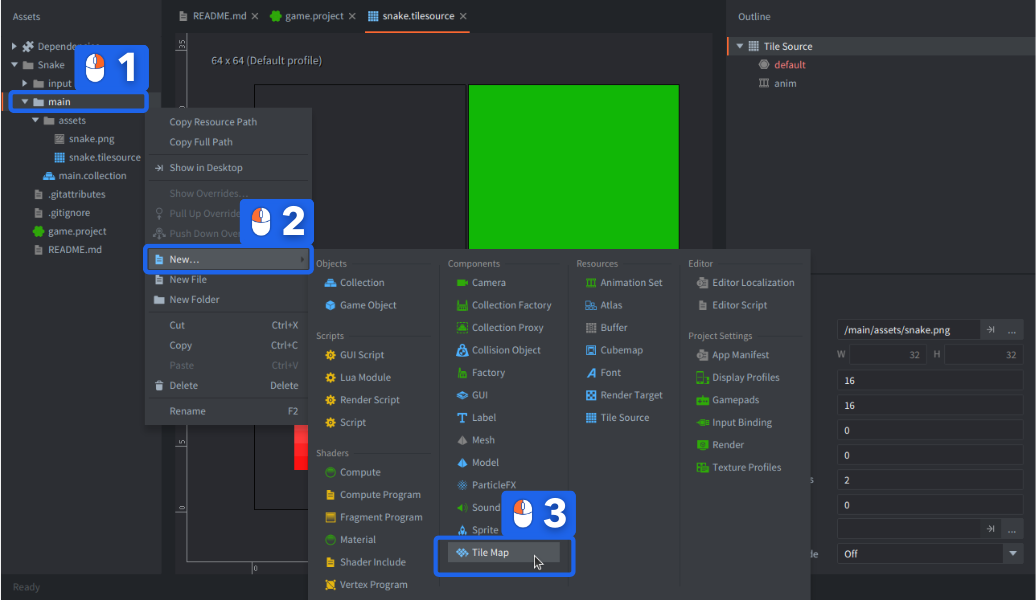
-
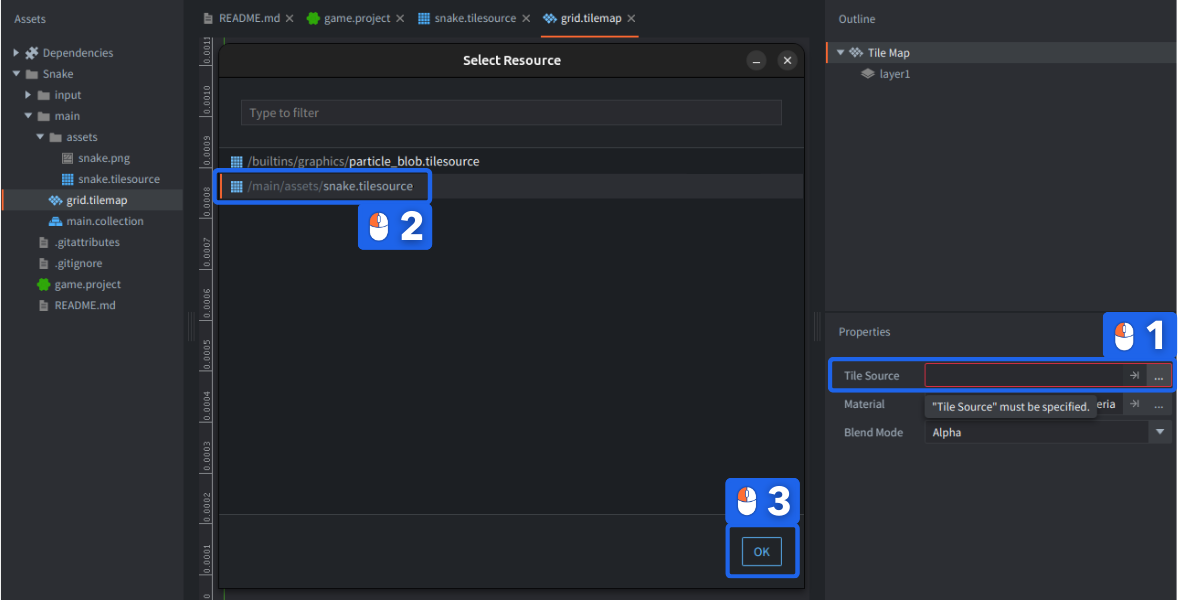
它会在 Tile Map Editor 中打开,并提示需要 Tile Source,因此将 Tile Source 属性设置为之前创建的 “snake.tilesource”。
完成!
在瓦片地图中绘制瓦片
Defold 只会存储瓦片地图中实际使用的区域,因此您需要添加足够的瓦片来填满屏幕边界。
- 在右侧
Outline面板中选择layer1图层。 -
选择菜单项
Edit▸Select Tile...,或使用快捷键 Space 显示瓦片调色板,然后点击绘制时要使用的瓦片。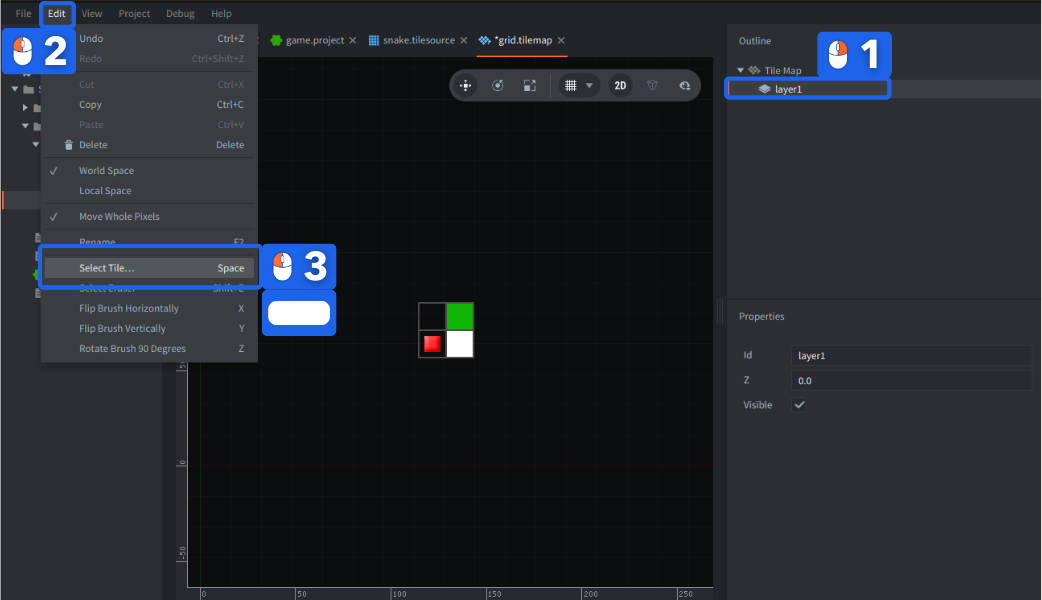
- 沿屏幕边缘绘制边框,并绘制一些障碍物。
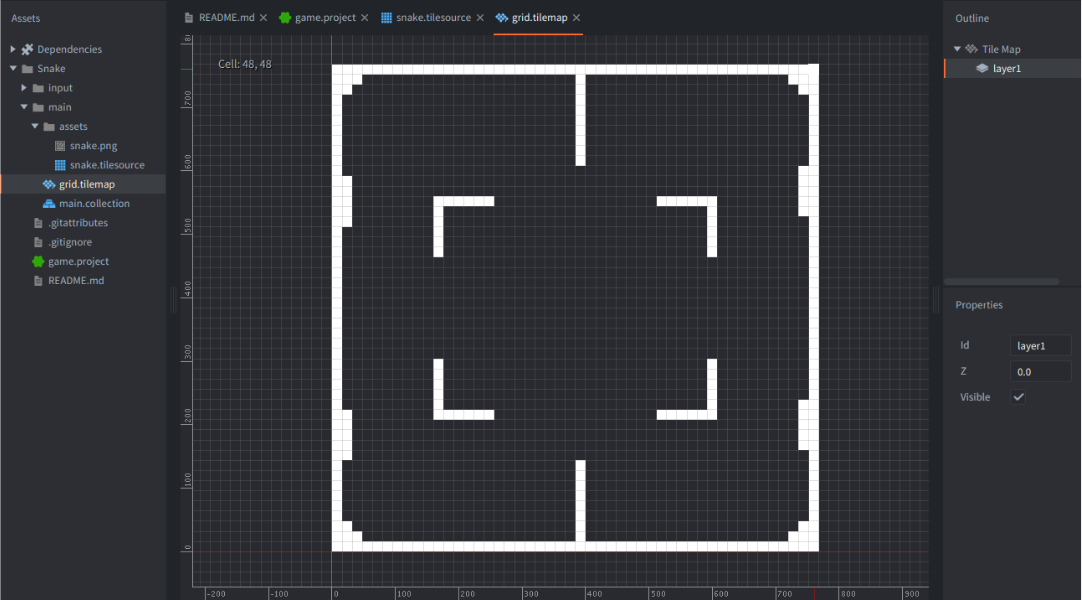
您需要 48x48 个瓦片大小的瓦片地图(因为显示尺寸是 768,瓦片是 16px,所以 768/16 = 48)来填满游戏屏幕。
完成后保存瓦片地图。
完成!
将瓦片地图添加到游戏
现在需要把瓦片地图添加到游戏中。如果您熟悉 Defold 构建块,会知道组件属于 Game Objects,而游戏对象可以定义在 Collections 中。
-
在
Assets面板中双击main.collection打开它。在 Empty Project 模板中,它默认是引擎启动时加载的 bootstrap collection。 -
Right click
Outline中的根节点,并选择Add Game Object,这会在游戏启动时加载的集合中创建一个新游戏对象。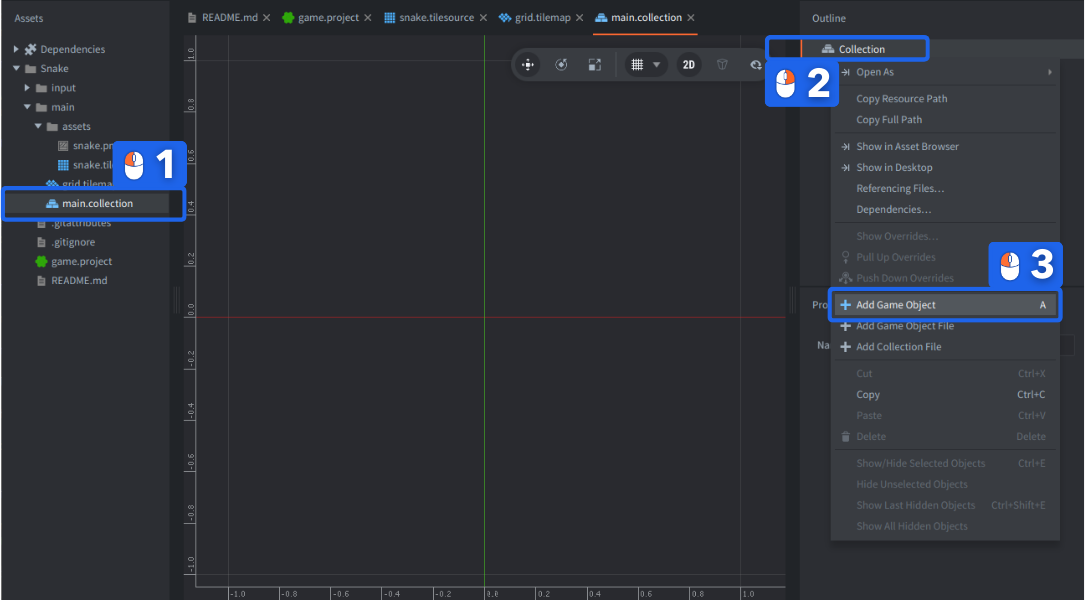
-
Right click 新游戏对象,并选择
Add Component File。选择刚刚创建的 “grid.tilemap” 文件。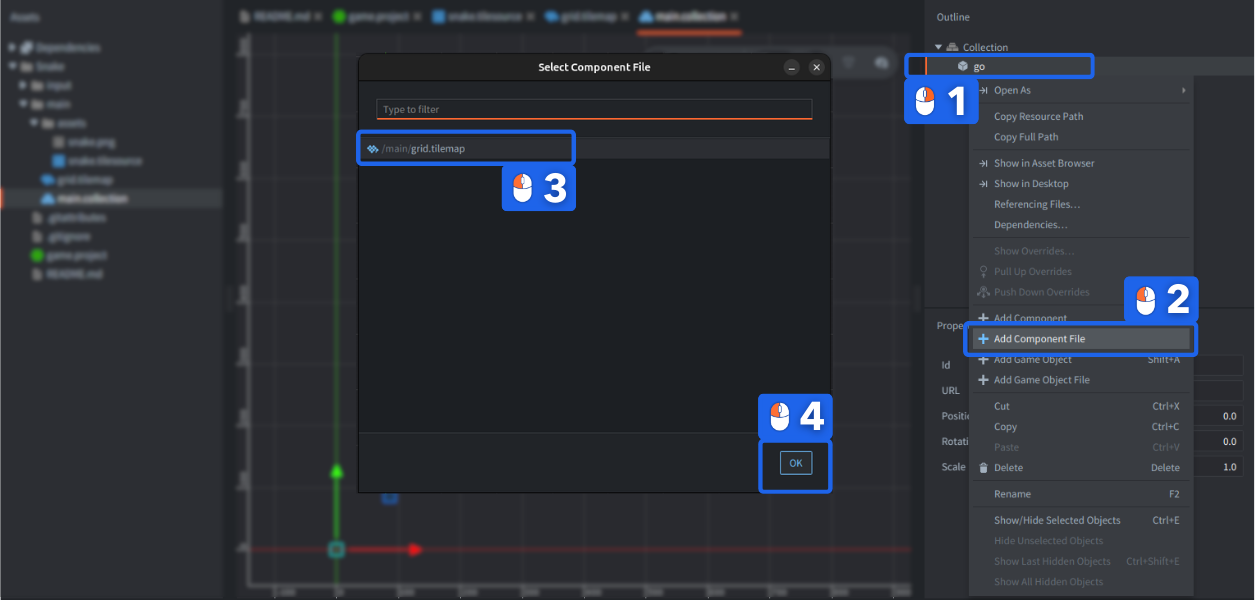
现在游戏集合中已经有瓦片地图了。从编辑器运行游戏时,它应当可见。
- 选择
Project▸Build,或使用快捷键 Ctrl + B(Mac 上为 ⌘Cmd + B)。
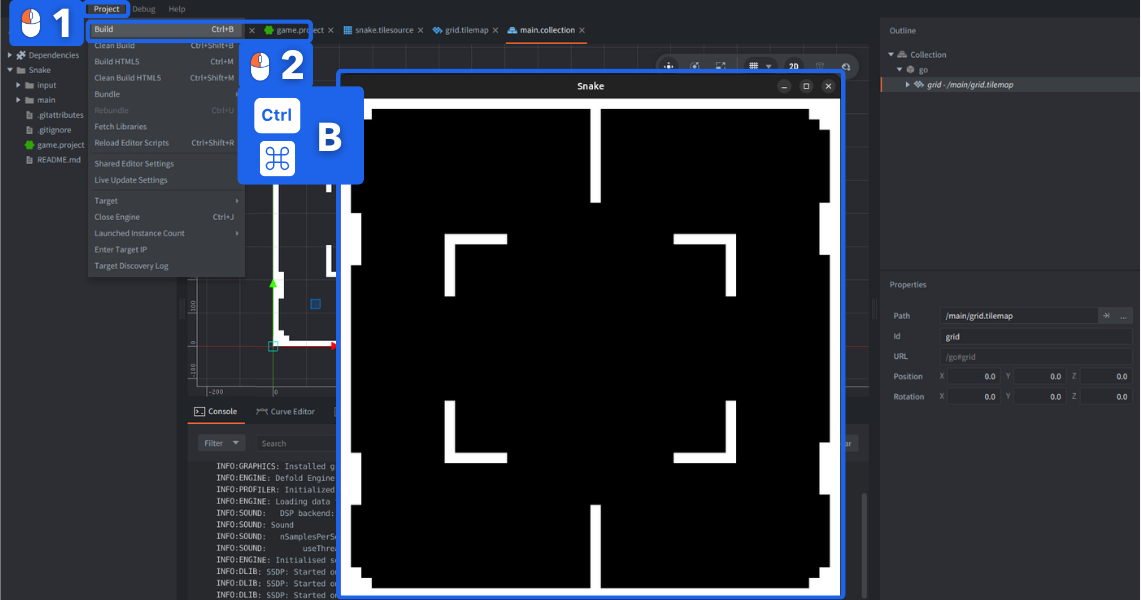
完成!
向游戏添加脚本
-
在
Assets浏览器中 Right clickmain文件夹,并在 Scripts 部分选择New▸Script。将新脚本文件命名为 “snake”(它会保存为 “snake.script”)。这个文件将包含游戏的所有逻辑。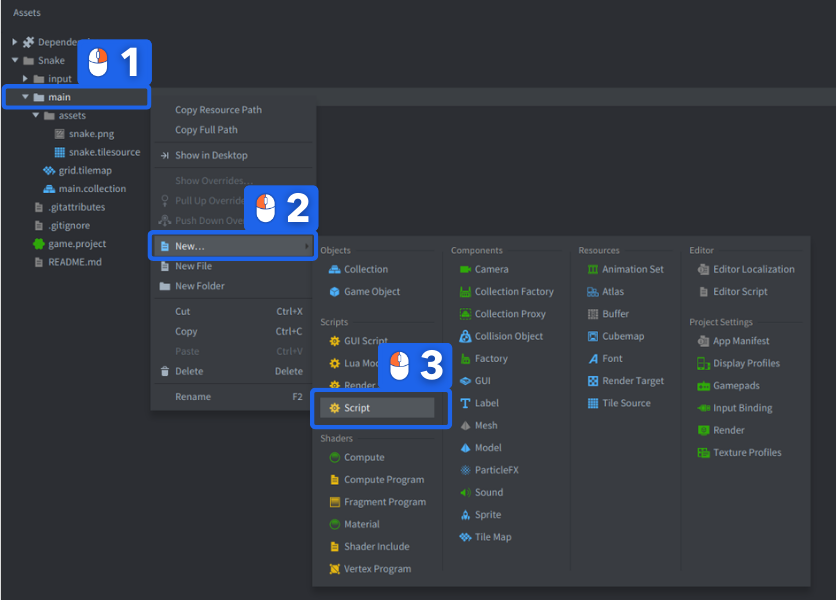
-
回到 main.collection,并 right click 持有瓦片地图的游戏对象。选择 Add Component File,并选择 “snake.script” 文件。
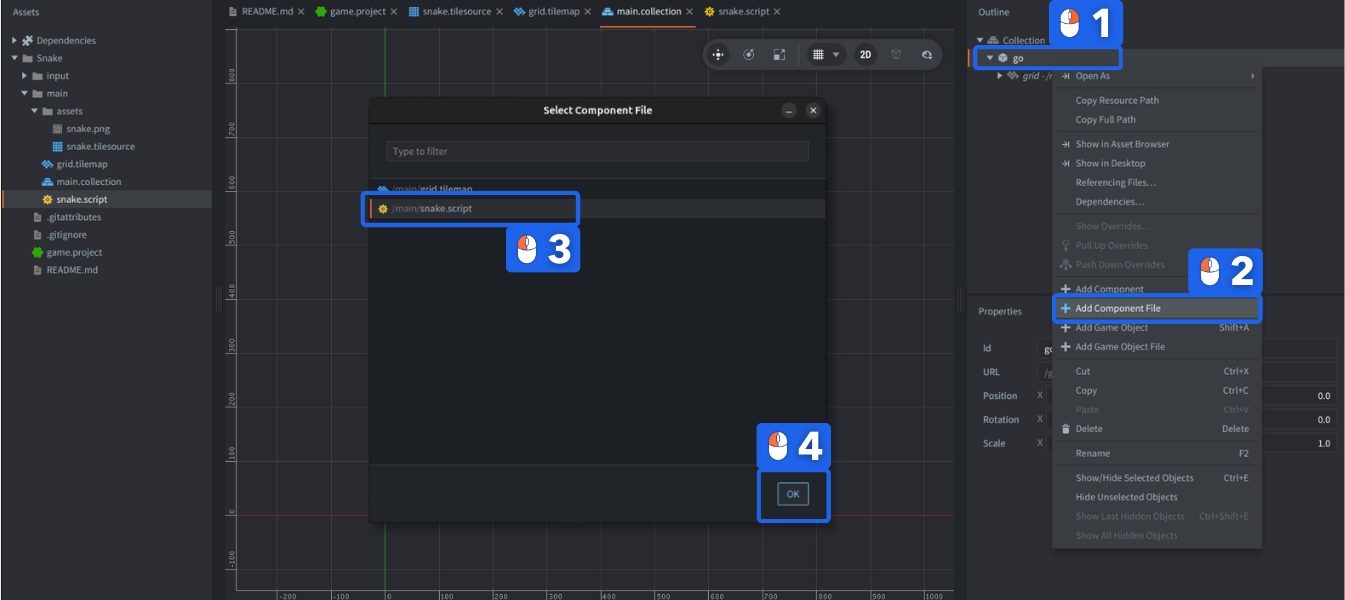
现在瓦片地图组件和脚本都已经就位。
完成!
游戏脚本
接下来编写的脚本将驱动整个游戏。我们会逐个添加功能。
简单移动算法
工作方式的想法如下:
- 脚本保存蛇当前占据的瓦片位置列表。
- 如果玩家按下方向键,保存蛇应该移动的方向。
- 按固定时间间隔,让蛇沿当前移动方向移动一步。
初始化
打开 snake.script 并找到 init() 函数。游戏启动时,当脚本初始化时,引擎会调用此函数。将代码修改为:
function init(self)
    self.segments = { -- <1>
        {x = 7, y = 24},
        {x = 8, y = 24},
        {x = 9, y = 24},
        {x = 10, y = 24}
    }
    self.dir = {x = 1, y = 0} -- <2>
    self.speed = 7.0 -- <3>
    self.time = 0 -- <4>
end
在这段代码中:
- 将蛇的片段存储为名为
self.segments的 Lua 表,其中包含一组表,每个表保存一个片段的 X 和 Y 位置。 - 将当前方向存储为名为
self.dir的表,其中保存 X 和 Y 方向。 - 将当前移动速度存储在
self.speed中,以每秒移动多少个瓦片表示。 - 将计时器值存储在
self.time中,用于跟踪移动速度。
上面的脚本代码使用 Lua 语言编写。关于这段代码有几点值得注意,但如果暂时看不懂下面的内容也不用担心。先跟着做、实验并给自己一点时间,最终会理解。现在只需要记住:在 init() 中,我们初始化了接下来要使用的变量。
- Defold 保留了一组内置回调函数,它们会在脚本组件生命周期中被调用。这些不是方法,而是普通函数。
- 运行时会通过参数
self传入当前脚本组件实例的引用。self引用用于存储实例数据。 self引用可以当作 Lua 表使用,您可以在其中存储数据。像使用任何其他表一样使用点号写法:self.data = "value"。该引用在脚本生命周期内有效,在本例中从游戏开始直到退出。- Lua 表字面量用花括号
{}包围。 - 表条目可以是键/值对(
{x = 10, y = 20})、嵌套 Lua 表({ {a = 1}, {b = 2} })或其他数据类型。
完成!
Update
init() 函数在脚本组件实例化到运行中的游戏时只调用一次。而 update() 函数会在每一帧调用一次。这使它非常适合实时游戏逻辑。
更新逻辑的想法是:按某个固定间隔执行以下操作:
- 找到蛇头所在位置,然后在它旁边、由当前移动方向偏移的位置创建一个新蛇头。因此,如果蛇移动方向是 X=1、Y=0,当前蛇头在 X=0、Y=0,那么新蛇头应位于 X=1、Y=0。
- 将新蛇头位置保存到组成蛇的片段列表中。
- 从片段表中获取蛇尾位置。
- 清除该位置的蛇尾瓦片。
- 在表中的各个位置绘制所有蛇身片段(瓦片)。
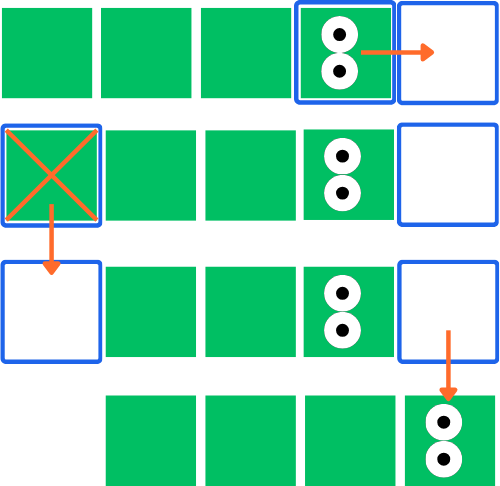
:::sidenote 请记住,蛇头在表的末尾,蛇尾在表的开头。 :::
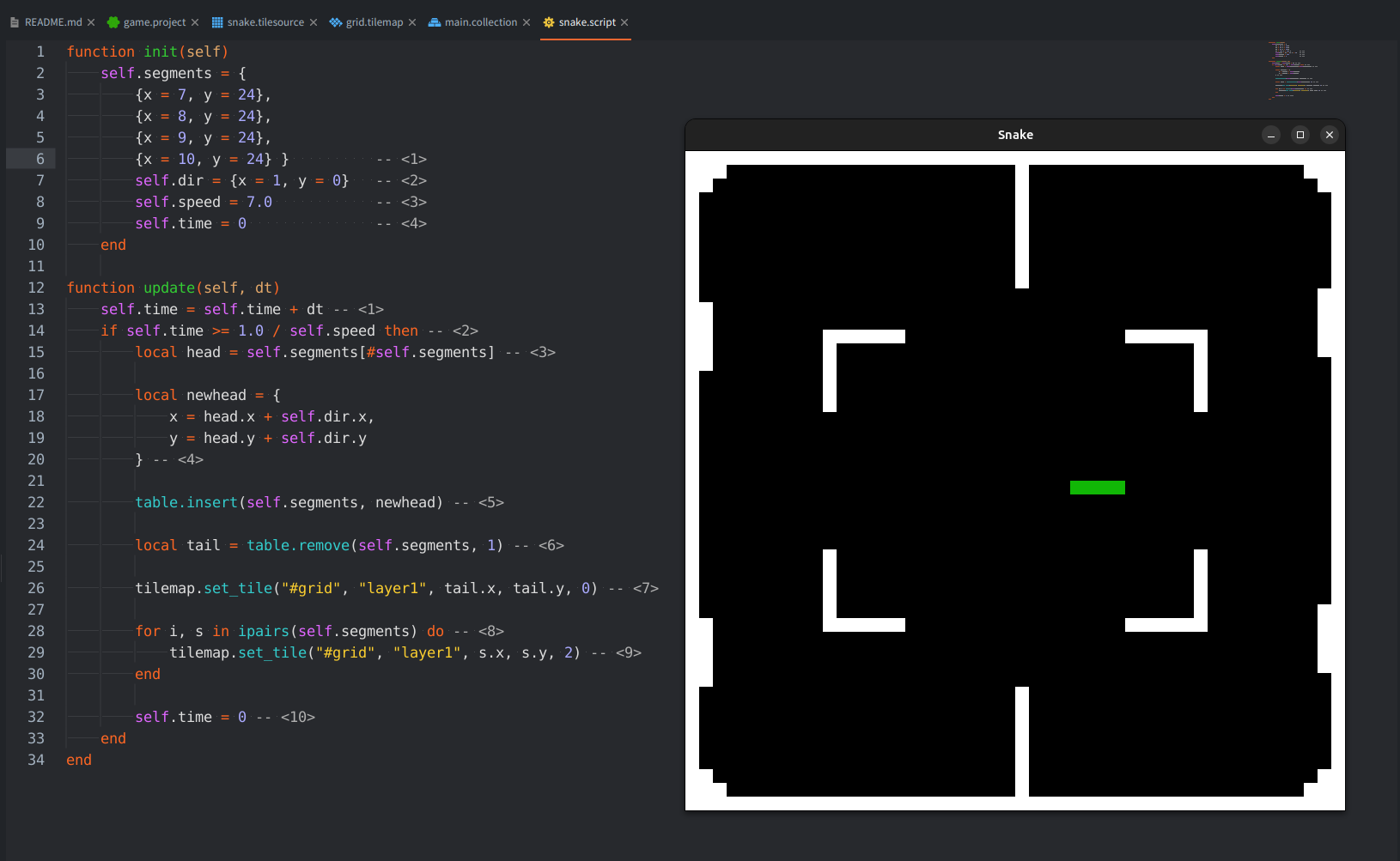
- 在 snake.script 中找到
update()函数,并将代码修改为:
function update(self, dt)
    self.time = self.time + dt -- <1>
    if self.time >= 1.0 / self.speed then -- <2>
        local head = self.segments[#self.segments] -- <3>

        local newhead = {
            x = head.x + self.dir.x,
            y = head.y + self.dir.y
        } -- <4>

        table.insert(self.segments, newhead) -- <5>

        local tail = table.remove(self.segments, 1) -- <6>

        tilemap.set_tile("#grid", "layer1", tail.x, tail.y, 0) -- <7>

        for i, s in ipairs(self.segments) do -- <8>
            tilemap.set_tile("#grid", "layer1", s.x, s.y, 2) -- <9>
        end

        self.time = 0 -- <10>
    end
end
在这段代码中:
- 用自上次调用
update()以来的时间差(秒)推进计时器,也就是所谓的 “delta time” 或dt。 - 如果计时器已经推进足够久:
- 获取当前蛇头位置。
#是获取表长度的操作符,前提是该表按数组使用,本例中正是如此,所有片段都是没有指定键的表值。 - 根据当前蛇头位置和移动方向(
self.dir)创建新的蛇头片段。 - 将新蛇头添加到片段表(末尾)。
- 从片段表开头移除蛇尾。
- 清除被移除蛇尾位置的瓦片。我们的瓦片地图
#grid只有一个名为layer1的图层。 - 遍历片段表中的元素。每次迭代中,
i是表中的位置(从 1 开始),s是当前片段。 - 将片段所在位置的瓦片设置为值 2(绿色蛇身瓦片)。
- 完成后,将计时器重置为零。
现在运行游戏,您应该会看到 4 个片段长的蛇从左向右爬过游戏场地。
完成!
玩家输入
在添加响应玩家输入的代码之前,需要先设置输入连接。
输入绑定
- 在
input文件夹中找到game.input_binding文件并 double click 打开。 - 为向上、向下、向左、向右移动添加一组 Key Trigger 绑定。在 Input 列中选择键盘按键,在 Action 列中输入动作名称。
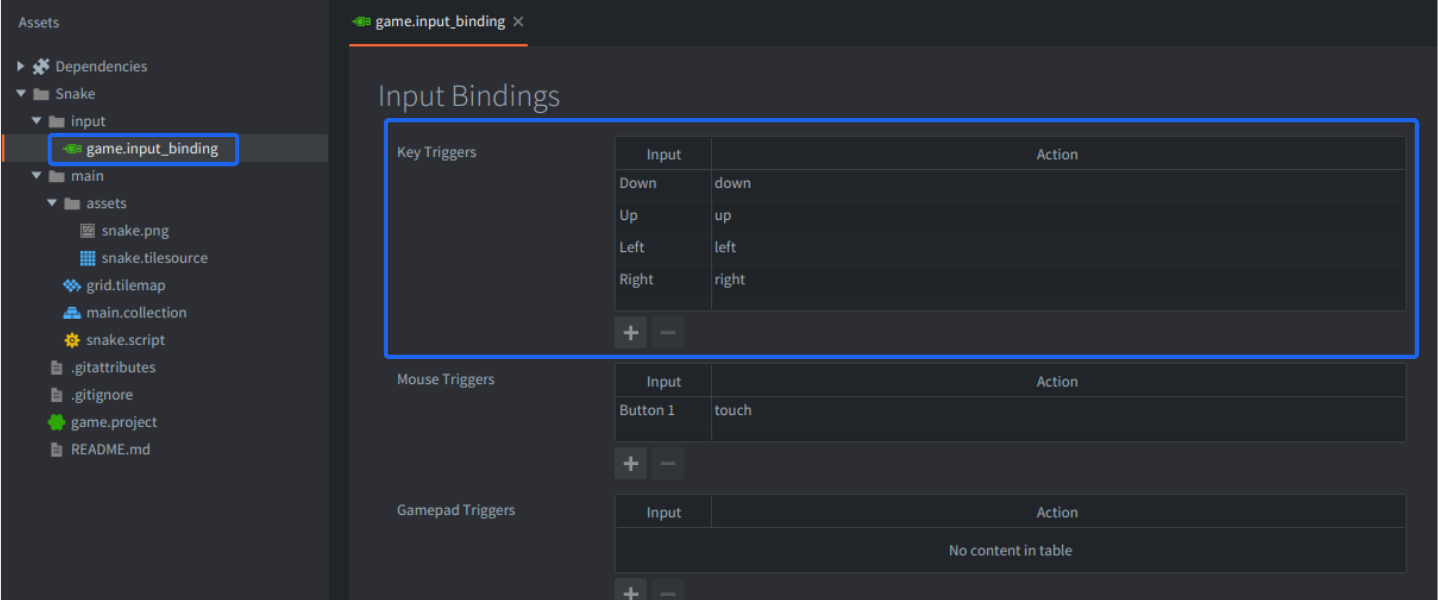
输入绑定文件会将实际用户输入(按键、鼠标移动等)映射到动作名称,再传给请求输入的脚本。
完成!
获取输入焦点
绑定就绪后,打开 snake.script,在 init() 函数开头添加以下行:
function init(self)
    msg.post(".", "acquire_input_focus") -- <1>

    self.segments = {
        {x = 7, y = 24},
        {x = 8, y = 24},
        {x = 9, y = 24},
        {x = 10, y = 24}
    }
    self.dir = {x = 1, y = 0}
    self.speed = 7.0
    self.time = 0
end
新增的这一行:
- 向当前游戏对象(”.” 是当前游戏对象的简写)发送消息,告诉它开始接收来自引擎的输入。
然后找到 on_input 函数并输入以下代码:
function on_input(self, action_id, action)
    if action_id == hash("up") and action.pressed then -- <1>
        self.dir.x = 0 -- <2>
        self.dir.y = 1
    elseif action_id == hash("down") and action.pressed then
        self.dir.x = 0
        self.dir.y = -1
    elseif action_id == hash("left") and action.pressed then
        self.dir.x = -1
        self.dir.y = 0
    elseif action_id == hash("right") and action.pressed then
        self.dir.x = 1
        self.dir.y = 0
    end
end
这些 if...elseif... 分支执行以下操作:
- 如果接收到输入绑定中设置的 “up” 输入动作,并且
action表的pressed字段为true(玩家按下按键),那么: - 设置移动方向。
再次运行游戏,确认可以控制蛇。
完成!
改进输入处理
现在请注意,如果同时按下两个键,会导致 on_input() 被调用两次,每个按键一次。按上面的写法,只有最后一次调用会影响蛇的方向,因为后续对 on_input() 的调用会覆盖 self.dir 中的值。
另外,如果蛇正在向左移动,而您按下 right 键,蛇会转向撞到自己。这个问题看似显而易见的修复方法,是在 on_input() 的 if 子句中增加额外条件:
if action_id == hash("up") and self.dir.y ~= -1 and action.pressed then
    ...
elseif action_id == hash("down") and self.dir.y ~= 1 and action.pressed then
    ...
然而,如果蛇正在向左移动,玩家在下一次移动步骤发生前快速先按 up,再按 right,只有 right 会生效,蛇会撞向自己。即使给上面的 if 子句添加条件,这个输入也会被忽略。这不好!
这个问题的正确解决方案是把输入存入队列,并在蛇移动时从队列取出条目:
function init(self)
    msg.post(".", "acquire_input_focus")

    self.segments = {
        {x = 7, y = 24},
        {x = 8, y = 24},
        {x = 9, y = 24},
        {x = 10, y = 24}
    }
    self.dir = {x = 1, y = 0}
    self.speed = 7.0
    self.time = 0

    self.dirqueue = {} -- <1>
end
这一次,我们:
- 添加了变量
self.dirqueue,并将其初始化为空表。
在 update() 函数中添加:
function update(self, dt)
    self.time = self.time + dt
    if self.time >= 1.0 / self.speed then
        local newdir = table.remove(self.dirqueue, 1) -- <1>
        if newdir then
            local opposite = newdir.x == -self.dir.x or newdir.y == -self.dir.y -- <2>
            if not opposite then
                self.dir = newdir -- <3>
            end
        end

        local head = self.segments[#self.segments]
        local newhead = {x = head.x + self.dir.x, y = head.y + self.dir.y}

        table.insert(self.segments, newhead)

        local tail = table.remove(self.segments, 1)
        tilemap.set_tile("#grid", "layer1", tail.x, tail.y, 0)

        for i, s in ipairs(self.segments) do
            tilemap.set_tile("#grid", "layer1", s.x, s.y, 2)
        end

        self.time = 0
    end
end
- 从方向队列中取出第一项。
- 如果存在一项(
newdir不是 nil),则检查newdir是否指向self.dir的相反方向。 - 只有在新方向不指向相反方向时,才设置新方向。
并修改 on_input,改为将当前输入存入队列:
function on_input(self, action_id, action)
    if action_id == hash("up") and action.pressed then
        table.insert(self.dirqueue, {x = 0, y = 1}) -- <1>
    elseif action_id == hash("down") and action.pressed then
        table.insert(self.dirqueue, {x = 0, y = -1})
    elseif action_id == hash("left") and action.pressed then
        table.insert(self.dirqueue, {x = -1, y = 0})
    elseif action_id == hash("right") and action.pressed then
        table.insert(self.dirqueue, {x = 1, y = 0})
    end
end
- 将输入方向添加到方向队列,而不是直接设置
self.dir。
启动游戏并确认它按预期运行。
完成!
食物和障碍物碰撞
蛇需要地图上的食物,才能变得更长、更快。来添加食物吧!
生成食物
在 init() 函数上方添加一个新函数:
local function put_food(self) -- <1>
    self.food = {x = math.random(2, 47), y = math.random(2, 47)} -- <2>
    tilemap.set_tile("#grid", "layer1", self.food.x, self.food.y, 3) -- <3>
end
在此函数中:
- 声明一个名为
put_food()的新函数,用于在地图上放置一份食物。 - 在名为
self.food的变量中存储随机 X 和 Y 位置。 - 将 X 和 Y 位置的瓦片设置为值 3,也就是食物图形的瓦片。
然后在 init() 函数末尾调用它:
function init(self)
    msg.post(".", "acquire_input_focus")

    self.segments = {
        {x = 7, y = 24},
        {x = 8, y = 24},
        {x = 9, y = 24},
        {x = 10, y = 24}
    }
    self.dir = {x = 1, y = 0}
    self.dirqueue = {}
    self.speed = 7.0
    self.time = 0

    math.randomseed(socket.gettime()) -- <1>
    put_food(self) -- <2>
end
- 在开始用
math.random()取随机值之前设置随机种子,否则会生成相同的随机值序列。这个种子只应设置一次。 - 在游戏开始时调用
put_food()函数,让玩家一开始就能在地图上看到一个食物。
完成!
吃掉食物
现在,检测蛇是否与某物碰撞,只需要查看蛇即将前往的瓦片地图位置上有什么,并做出反应。
添加一个变量,用于跟踪蛇是否还活着:
function init(self)
    msg.post(".", "acquire_input_focus")

    self.segments = {
        {x = 7, y = 24},
        {x = 8, y = 24},
        {x = 9, y = 24},
        {x = 10, y = 24}
    }
    self.dir = {x = 1, y = 0}
    self.dirqueue = {}
    self.speed = 7.0
    self.time = 0

    self.alive = true -- <1>

    math.randomseed(socket.gettime())
    put_food(self)
end
- 一个标志,用于表示蛇是否还活着。
然后添加检测墙/障碍物和食物碰撞的逻辑:
function update(self, dt)
    self.time = self.time + dt
    if self.time >= 1.0 / self.speed and self.alive then -- <1>
        local newdir = table.remove(self.dirqueue, 1)

        if newdir then
            local opposite = newdir.x == -self.dir.x or newdir.y == -self.dir.y
            if not opposite then
                self.dir = newdir
            end
        end

        local head = self.segments[#self.segments]
        local newhead = {x = head.x + self.dir.x, y = head.y + self.dir.y}

        table.insert(self.segments, newhead)

        local tile = tilemap.get_tile("#grid", "layer1", newhead.x, newhead.y) -- <2>

        if tile == 2 or tile == 4 then
            self.alive = false -- <3>
        elseif tile == 3 then
            self.speed = self.speed + 1 -- <4>
            put_food(self)
        else
            local tail = table.remove(self.segments, 1) -- <5>
            tilemap.set_tile("#grid", "layer1", tail.x, tail.y, 1)
        end

        for i, s in ipairs(self.segments) do
            tilemap.set_tile("#grid", "layer1", s.x, s.y, 2)
        end

        self.time = 0
    end
end
- 只有当蛇还活着时才推进蛇的移动。
- 在绘制到瓦片地图之前,读取新蛇头所在位置的瓦片。
- 如果瓦片是障碍物或蛇的另一部分,游戏结束!
- 如果瓦片是食物,则提高速度,然后放置新的食物。
- 请注意,只有在没有碰撞时才会移除蛇尾。这意味着如果玩家吃到食物,因为这次移动没有移除蛇尾,蛇会增长一个片段。
现在试试游戏,确认它玩起来正常!
本教程到此结束,但请继续尝试修改游戏,并完成下面的一些练习!
完成!
完整脚本
以下是完整脚本代码,供参考:
local function put_food(self)
    self.food = {x = math.random(2, 47), y = math.random(2, 47)}
    tilemap.set_tile("#grid", "layer1", self.food.x, self.food.y, 3)
end

function init(self)
    msg.post(".", "acquire_input_focus")

    self.segments = {
        {x = 7, y = 24},
        {x = 8, y = 24},
        {x = 9, y = 24},
        {x = 10, y = 24}
    }
    self.dir = {x = 1, y = 0}
    self.dirqueue = {}
    self.speed = 7.0
    self.time = 0

    self.alive = true

    math.randomseed(socket.gettime())
    put_food(self)
end

function update(self, dt)
    self.time = self.time + dt
    if self.time >= 1.0 / self.speed and self.alive then
        local newdir = table.remove(self.dirqueue, 1)

        if newdir then
            local opposite = newdir.x == -self.dir.x or newdir.y == -self.dir.y
            if not opposite then
                self.dir = newdir
            end
        end

        local head = self.segments[#self.segments]
        local newhead = {x = head.x + self.dir.x, y = head.y + self.dir.y}

        table.insert(self.segments, newhead)

        local tile = tilemap.get_tile("#grid", "layer1", newhead.x, newhead.y)

        if tile == 2 or tile == 4 then
            self.alive = false
        elseif tile == 3 then
            self.speed = self.speed + 1
            put_food(self)
        else
            local tail = table.remove(self.segments, 1)
            tilemap.set_tile("#grid", "layer1", tail.x, tail.y, 1)
        end

        for i, s in ipairs(self.segments) do
            tilemap.set_tile("#grid", "layer1", s.x, s.y, 2)
        end

        self.time = 0
    end
end

function on_input(self, action_id, action)
    if action_id == hash("up") and action.pressed then
        table.insert(self.dirqueue, {x = 0, y = 1})
    elseif action_id == hash("down") and action.pressed then
        table.insert(self.dirqueue, {x = 0, y = -1})
    elseif action_id == hash("left") and action.pressed then
        table.insert(self.dirqueue, {x = -1, y = 0})
    elseif action_id == hash("right") and action.pressed then
        table.insert(self.dirqueue, {x = 1, y = 0})
    end
end
练习
尝试实现这些改进会是很好的练习:
- 添加按键输入处理,在游戏结束时重新开始游戏。
- 添加计分和分数计数器,可以只使用一个 label 组件(更简单),也可以制作完整 gui。
- put_food() 函数没有考虑蛇的位置或障碍物。修复它,使食物只生成在空闲位置。
- 游戏结束时显示 “Game Over” 消息,并允许玩家重试。
- 额外挑战:添加第二条由玩家控制的蛇。