

Defold in the middle of 2026 - a summary
By The Defold Foundation on Jun 30, 2026
Tagged as: Retrospective, News, Html5, 3d, Physics, Editor, Shaders
Defold - summary of the first half of 2026
The first half of 2026 has been an important period for Defold. Across five releases in the 1.12 series - 1.12.0, 1.12.1, 1.12.2, 1.12.3, and 1.12.4 - we continued improving the engine, editor, web runtime, rendering pipeline, 3D workflows, extensions, examples, and documentation. The period ends with Defold 1.13.0, one of the larger modernization releases. It brings, among other things, new Box2D scripting APIs, Morph Targets support for 3D models, rendering improvements, and a broad removal of deprecated APIs.
Earlier this year, in A look ahead for 2026, we outlined several priorities: better editor workflows, improved editor performance, more 3D work, richer animation support, rendering improvements, extension updates, and more tutorials and examples. Looking back at the first half of the year, many of those plans have already turned into concrete releases, and we are very glad to see that progress.
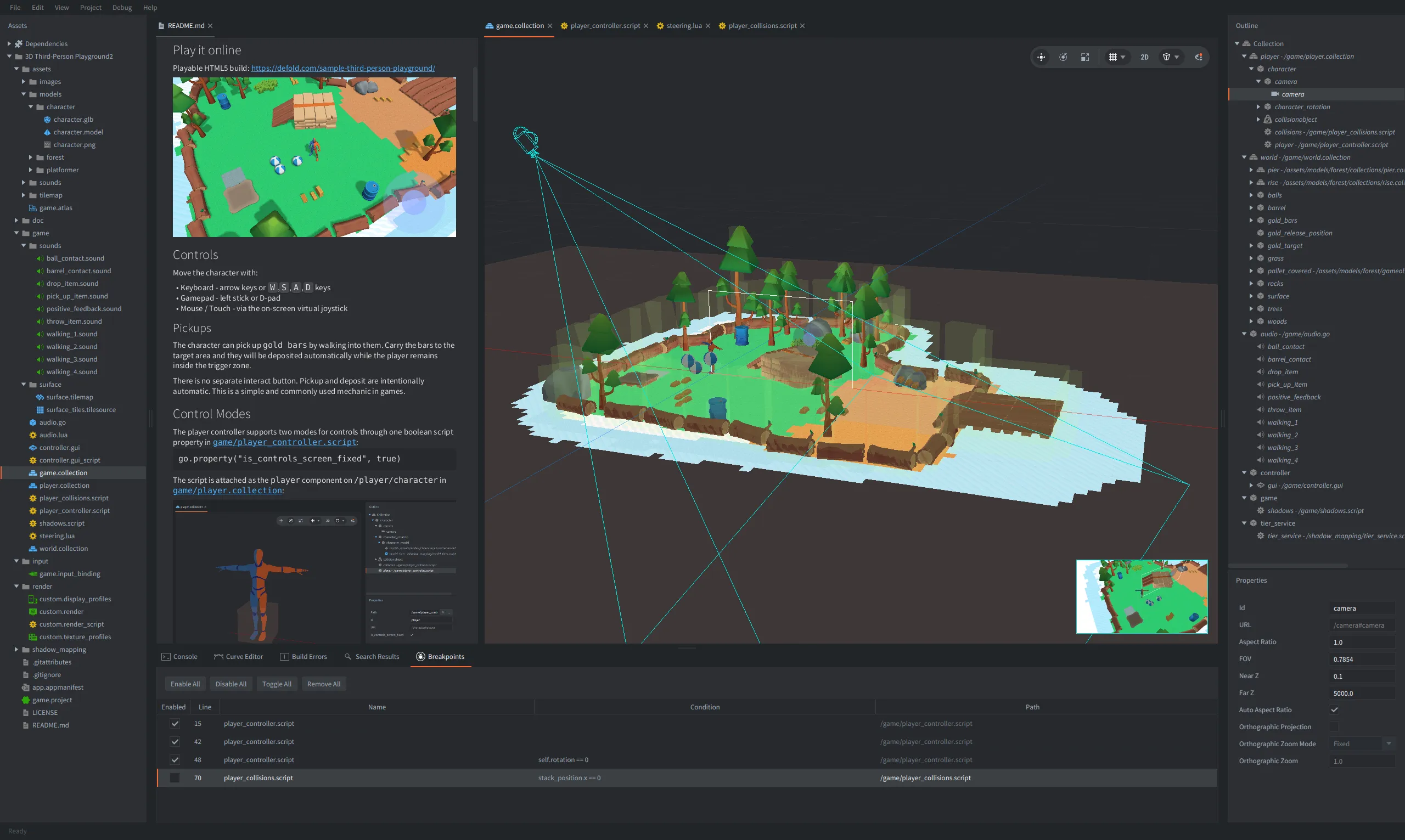
Defold Editor is now optimized for big 3D scenes, has a camera preview, a new breakpoints tab, and more!
A better foundation for game logic control
Defold 1.12.0 started the year with a change that affects how developers structure gameplay code: the update lifecycle was clarified and extended with the new late_update() function.
The new order is like this:
fixed_update()runs first as many times as needed to ensure a fixed timestep;update()runs once per frame;late_update()runs after regular update logic and before rendering.
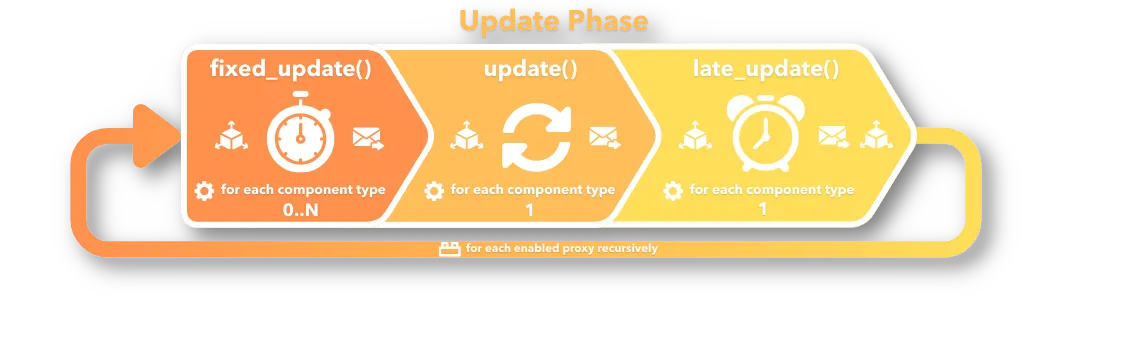
Messages are also flushed between each update phase, which gives developers more predictable control.
This is especially useful in projects where gameplay and presentation should not always happen in the same step. A common pattern is to update game logic first, then update visuals, camera, UI indicators, or other dependent systems. late_update() gives Defold projects a cleaner place for that kind of work. Check out more details in the updated Application Lifecycle manual.
Pause when idle - engine throttling
Defold 1.12.0 also introduced a new engine throttling API. It allows a game to temporarily skip full engine updates and rendering while still listening for input. As soon as input is detected, the engine wakes up again for a configurable cooldown period, after which it can return to the throttled state automatically. So instead of rendering and updating continuously when nothing is happening, Defold can now reduce work until the player interacts again.
This is especially useful for games and applications that spend time in mostly static states: menus, idle screens, turn-based games, puzzle games waiting for player input, and battery-sensitive mobile or other portable devices.
A major step for Box2D physics scripting
One of the most exciting parts of Defold 1.13.0 is the expanded Box2D scripting API.
Defold had always included strong physics support, but the new Box2D scripting functions give developers much more direct control from Lua. The release adds joint creation, inspection, destruction, body/shape access, fixture and shape manipulation, mass data access, sensor changes, filter updates, AABB queries, joint limits, motors, spring settings, damping, reaction forces, torque, and more. This is powerful because it opens up a wider class of physics-driven gameplay without requiring native code.
Box2D scripting unlocks many possibilities - check, for example, the tuning example.
With the new APIs, developers can more easily build things like:
- ropes, chains, bridges, cranes, vehicles, and mechanical contraptions;
- grappling hooks and swinging mechanics;
- destructible or reconfigurable physics structures;
- physics puzzles with dynamic joints and constraints;
- runtime-generated bodies and fixtures;
- vehicles with wheels, suspension, motors, and limits;
- tools and debug views that inspect physics state directly from Lua.
The added support covers both Box2D v2 and Box2D v3 APIs. The Physics joints manual and examples such as Box2D Mouse Joint, Box2D Motor Joint, Box2D Revolute Bridge, and Box2D Chain Terrain are good starting points.
Morph Targets, aka Blend Shapes, for 3D animation
Another major 1.13.0 feature is support for Morph Targets, also known as Blend Shapes, in 3D model components.
Animation and manual control of weights in Defold with the Aria Blake model.
This makes it possible to animate model shapes directly, which might be used for facial expressions, mouth movement, muscle deformation, soft-body-like effects, shape transitions, damage states, character customization, and many other effects that are awkward or impossible to express with skeletal animation alone. With morph target support, Defold’s glTF pipeline becomes more useful for expressive 3D characters and animation-heavy 3D projects.
It is part of a broader 3D cleanup. Defold 1.13.0 also removed Collada support and committed to glTF as the modern 3D asset format. This lets us focus our effort on the pipeline that matters most today instead of maintaining older and unsupported solutions. The release also fixed model transform inconsistencies between editor and runtime for imported glTF assets, making 3D behavior more predictable.
There is still more work ahead, but morph targets are a meaningful milestone for Defold’s 3D future. You can try this today in the Morph Target Animation and Morph Target Weights examples and read the Morph Targets manual.
Better Camera component
Camera has come a long way toward becoming a more useful component, and the camera API has grown. In the editor, the camera shows the active projection frustum and its representation is scaled properly.
Defold 1.12.0 added camera conversion helpers such as camera.world_to_screen() and camera.screen_to_world(), making it easier to connect world-space gameplay with screen-space UI or mouse/touch input. See also the World to Screen and Screen to World examples.
We also have adaptive zoom - the orthographic camera can now be adjusted even when using Fit or Cover mode, and the new camera.get_orthographic_auto_zoom() function and read-only orthographic_auto_zoom property were added. Because the camera is now selected with render.set_camera() in the render script, there is no need to acquire and release camera focus, and those functions, which had already been deprecated, have now been removed.
Since 1.13.0, you can also preview what a selected camera sees directly in the Editor. This makes it easier to set up the scene or set the correct camera position and orientation.
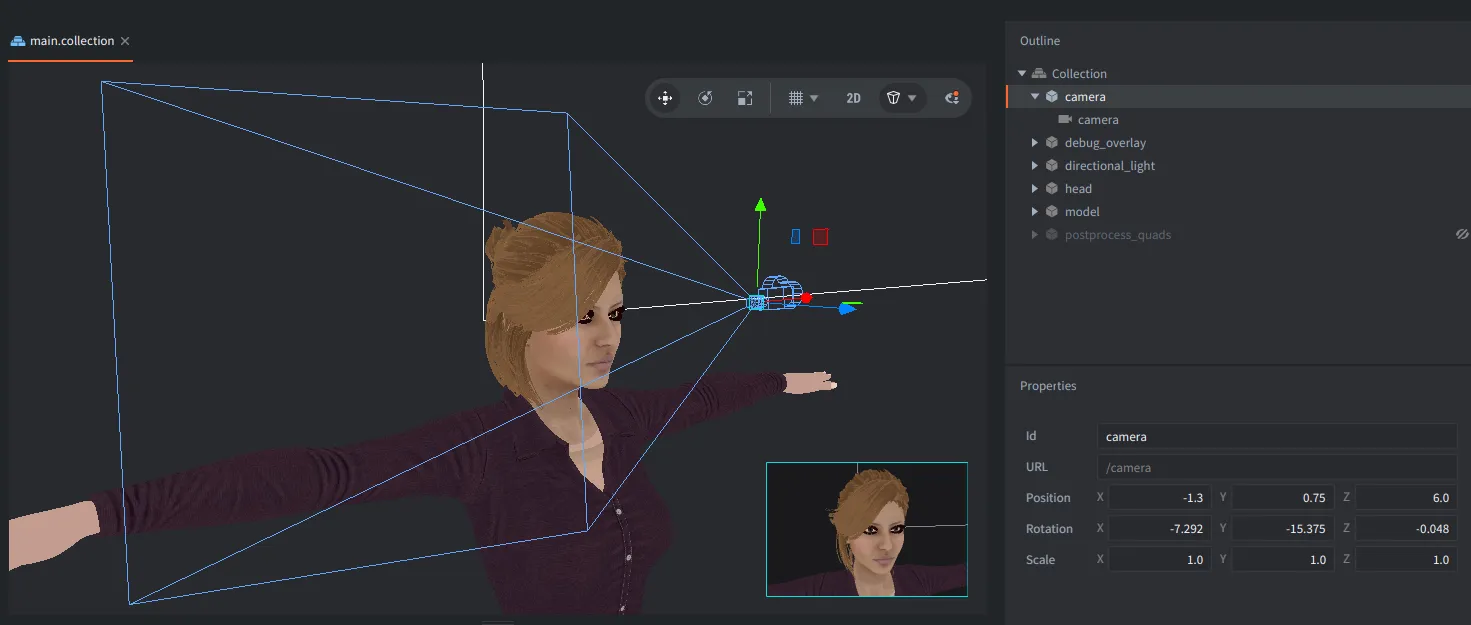
Camera preview directly in the Defold editor will help you create scenes and adjust camera position and orientation.
Going international - font shaping and collections
Besides the Editor and the documentation being translated to other languages like Chinese, Portuguese, and Russian, the engine has also supported runtime text shaping and font collections since 1.12.0. This improves how Defold handles more advanced text layout cases, including proper kerning pairs, ligatures, and right-to-left text. It is an important step for localization, especially for games targeting languages and scripts where basic left-to-right character placement is not enough.
The new workflow allows developers to associate multiple .ttf files with a single font resource and load only the fonts needed for a given language. It also supports prewarming text so required glyphs can be generated before they are shown on screen, which makes runtime-generated fonts more practical for multilingual games.

Right-to-left languages are now supported out of the box - check the localization example.
Web games
Web remains one of Defold’s strongest areas. In Defold 1.12.4, an empty HTML5 project was reduced to around 1.06 MB. We track size changes carefully to keep Defold as slim as possible. For browser games, this is not just a nice technical detail. It directly affects loading time, conversion from visit to play, player retention, and the ability to reach users on a wide range of devices.
We also continued cleaning up the web runtime. Unsupported and unused web functionality was removed, and with 1.13.0, Defold fully commits to wasm-web and removes the old asm.js target. WebAssembly is the modern and widely supported target for web games, and this lets Defold focus on one stronger, cleaner web path.
We also saw more real-world examples of Defold being used for web-first development, so we encourage you to read:
- Fingersoft brought Hill Climb Racing Lite to Poki with Defold,
- Orenji Spark rebuilt Jane’s Fashion Studio from Unity to Defold,
- Refold Games rebuilt Mad Skills Motocross 2 for Poki with Defold, using dynamic meshes and custom physics,
- Best practices when building for the web
If you are making web games - Defold is a great fit!
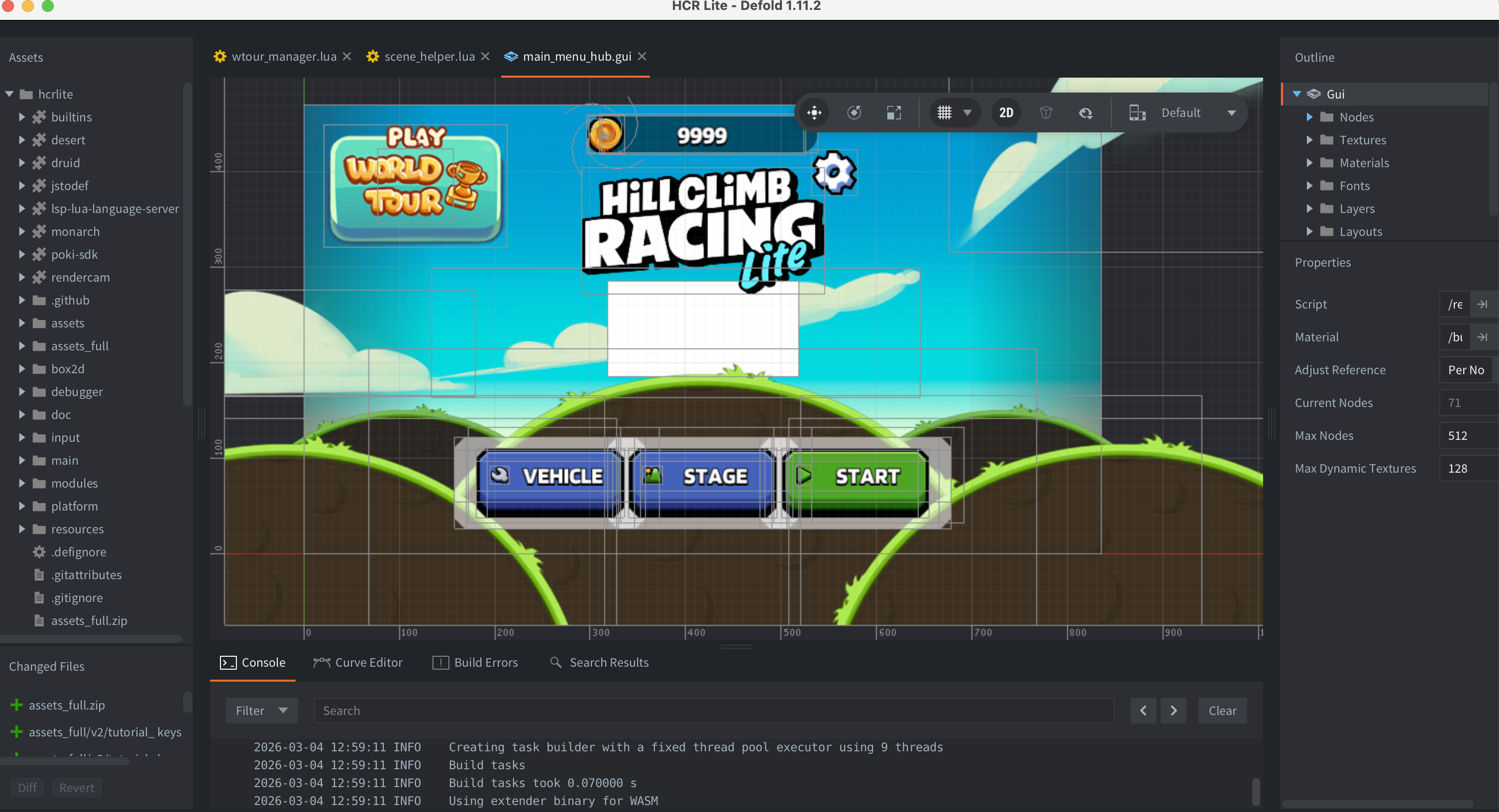
Hill Climb Racing Lite by Fingersoft in the Defold Editor
Mobile games
We care about all supported platforms and keep the SDKs updated. For example, besides engine throttling, Safe Area support for Android and iOS phones is now available in the engine out of the box, and you can control how the GUI respects it.
We’ve also released an official Firebase Crashlytics extension for Defold that might be useful if you want better crash reporting in your Defold Android, iOS, and macOS projects. Besides that, we’ve updated many other official extensions, which we’ll mention below.

Live Update
Live Update also moved forward. In 1.12.4, legacy Live Update APIs were deprecated, and in 1.13.0, the old auto-mount feature and the old Live Update archive format were removed. The recommended path is now clearer: use liveupdate.add_mount() and mount zip archives or folders explicitly.
The new direction gives developers more control over what is mounted, when it is mounted, and how content is prioritized. Developers can keep the first download small, get players into the game quickly, and then download additional content.
Live Update archives can also be mounted from Android assets, which is useful for asset delivery strategies, and can be added to the Android bundle either through bundle resources or as an install-time Play Asset Delivery pack.
Sounds good
While sound streaming already existed in 2025, this year we’ve pushed sound forward as well and introduced a new AVAudio backend for iOS/macOS, replacing the deprecated OpenAL backend.
In 1.12.1, we added Windows sound device recovery and improved how raw sounds are handled in the editor by wrapping them as embedded sound components.
In 1.12.4, we improved the internal sound buffers so they can grow dynamically, fixing crashes with high sample rates or high playback speed, increasing the maximum speed limit from 5 to 50, and adding a new Sound System section to the profiler.
Finally, we’ve also released the official FMOD extension for Defold, which gives users with more advanced sound system requirements the capabilities they need for their sound design.

Rendering and graphics keep moving forward
In 1.12.2, model components gained custom vertex attribute data support, allowing developers to set and animate model attributes from Lua. 1.12.3 exposed time to shaders and added a Texture Transform semantic, which made examples such as texture scrolling or true billboarding easier and cleaner.
Check out the billboarding example.
Defold 1.12.4 added shader precision options and increased texture units per draw from 8 to 16. This gives developers more room for complex materials and multi-texture effects, especially in 3D or advanced 2D rendering pipelines.
With 1.13.0, Vulkan is the default graphics API on Android, with OpenGL available as fallback. This release also improved and expanded blending options and added more shader constants, including commonly used inverse matrix variants. New graphics script functions expose information about the active graphics adapter and supported features. This allows game code and render scripts to make better decisions based on the current device and backend. It is especially useful for cross-platform games where rendering features may need to adapt between desktop, mobile, and web. New material and compute script modules make it possible to inspect and update material and compute resources from Lua.
Particle FX components now support frustum culling, which might give a boost for games with a lot of particle effects.
Defold’s rendering system has always been flexible through render scripts and materials, but these changes expose more of that power to game code.
Cleaner APIs
Defold 1.13.0 also removed a large number of deprecated Lua APIs and old constants.
This kind of cleanup can require migration work in older projects, but it is important for the long-term health of the engine. A small engine should also have a clean API. Removing deprecated functions, clarifying module boundaries, and consolidating graphics constants makes Defold easier to maintain, easier to document, and easier to teach.
It also gives us a better foundation for future features.
Defold Editor updates
Editor improvements were another major theme in the roadmap. Besides performance improvements, we also introduced many quality-of-life and user experience features, some of which were already mentioned above.
First of all, we now have a long-awaited Free Fly camera mode in Scene View, introduced in 1.12.4 and enabled by holding the right mouse button or toggled with Shift + ` (backtick). You can now freely fly or walk across your scenes. We also improved the camera and grid settings in the toolbar. This, plus the newest camera preview option and optimized performance for 3D, improves navigation and orientation when editing collections directly in the Editor.
Free Fly Camera mode in Defold Editor.
Defold 1.12.0 added restoration of open editor tabs and improved runtime font workflows.
Then, 1.12.1 improved the Properties view and added a brand-new Breakpoints tab, allowing you to quickly investigate and manage code breakpoints (including conditional ones) for quicker debugging. In this version, we also added a new Dependencies category in the Assets panel to keep libraries separated from project files, allowed assets to be dragged into resource pickers, and improved large-project loading performance.
Next, 1.12.2 improved the Asset Browser “New…” menu, tidying up our components, scripts, and other resources that can be created in Defold.
You can now also open images directly in the editor.
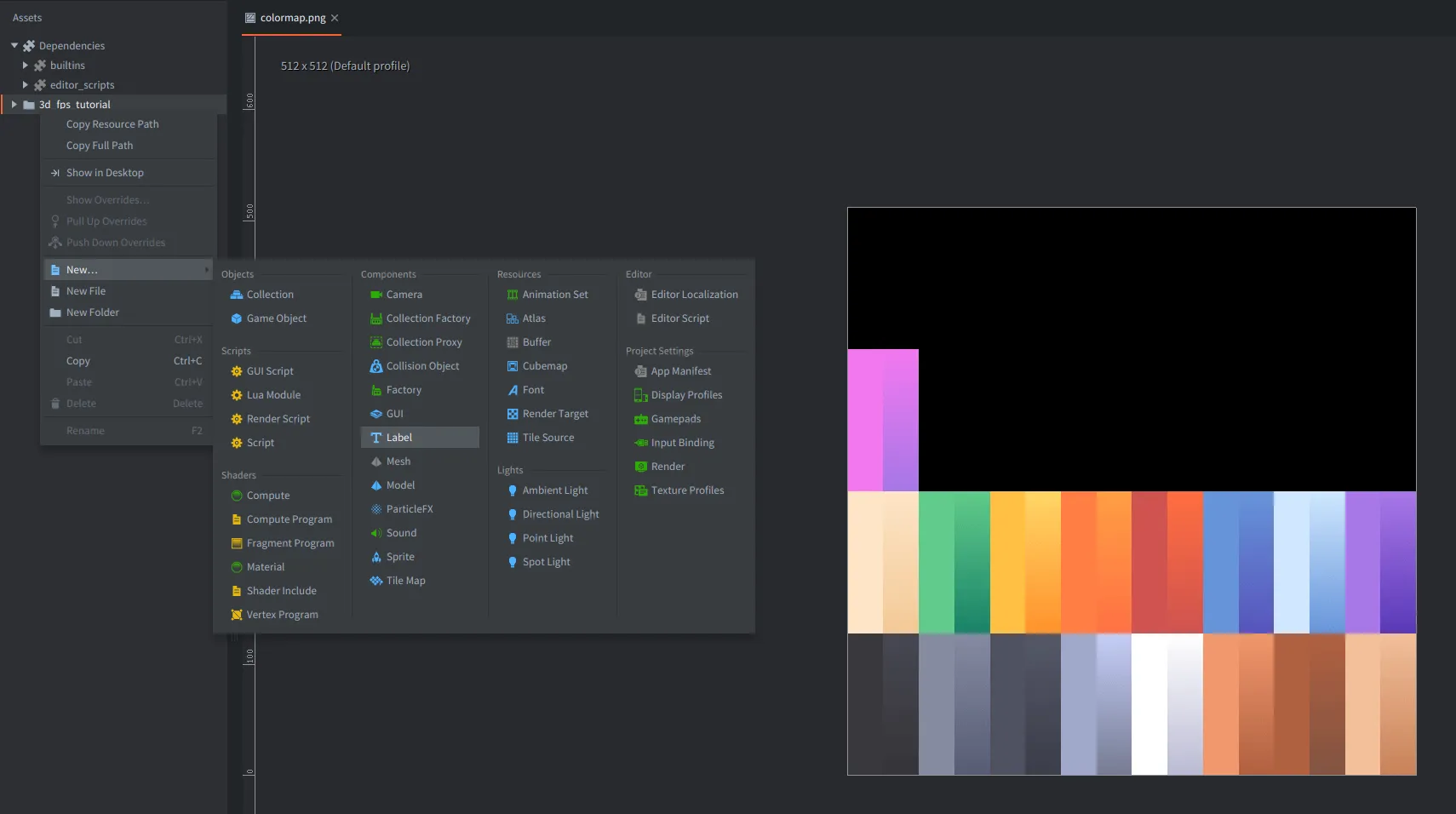
A better organised New... submenu (with Light components from the upcoming 1.13.1), PNG images opened directly in the editor, and the Dependencies section separated from project files in the Assets pane
Defold 1.12.3 brought the Script Structure side panel for code editing, and a new Properties API for Editor Scripts.
We also added editor.ui.image() for editor scripts, and this was immediately picked up by the community - Insality uses it to display thumbnails of browsed assets in the Asset Store.
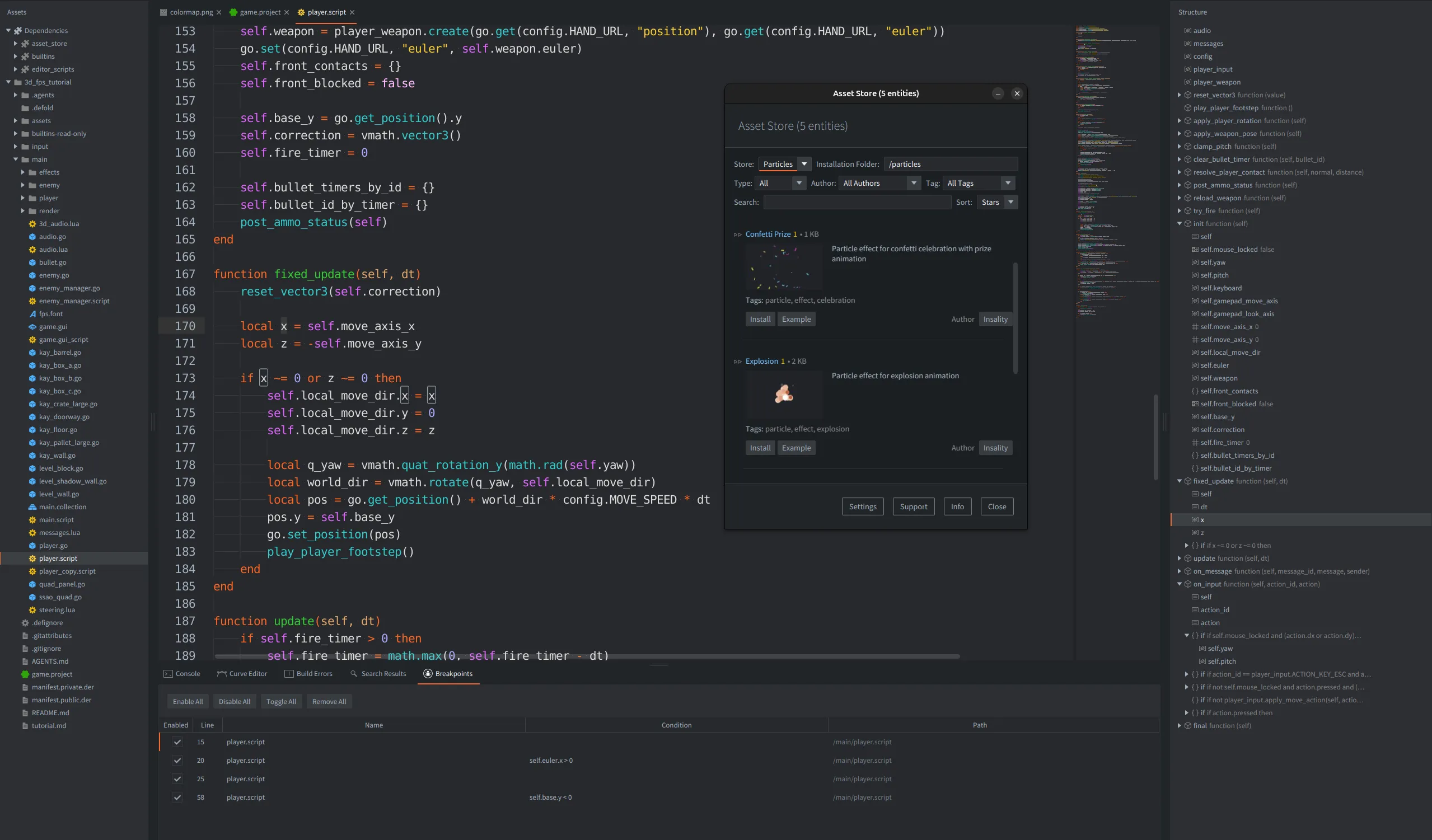
Asset Store by Insality uses images in custom editor UI. You can also notice a new Structure pane for script content and a new Breakpoints tab
In 1.12.4 we also improved camera controls, manipulator performance, and a glTF validator is now integrated into the asset pipeline.
Defold Editor is becoming faster, more scriptable, more useful for 3D work, and more suitable for larger production projects.
Automated and custom workflows
We also improved the /command/build endpoint, so external tools can know when a build has actually completed. In 1.12.3, we added OpenAPI support for the Editor HTTP Server, which makes the editor server easier to discover and use from external programs. In Defold 1.13.0, we introduced a new /eval endpoint for the editor server, which allows developers to design more automation systems. These features help users who want to incorporate agents into their workflow to close the loop, build more advanced toolchains, including local automation e.g. for testing, and create agentic systems that can inspect a project, run editor commands, evaluate small operations, trigger builds, and help developers with repetitive production tasks. We won’t be forcing AI-assisted workflows, but we’ll try to make development convenient and reliable for all users - those who want to use LLMs, and those who want to create custom automations.
We want the editor to stay lightweight, but also become more customizable and easier to integrate into each team’s workflow. Instead of forcing every project into the same large editor pipeline, Defold should provide reliable extension points and allow further customizations and automations for game creation, and we will keep moving in this direction.
Extensions continued to evolve
Extensions remain central to Defold’s design - we keep the engine lightweight, while powerful external integrations can be easily added to projects.
The Rive extension got major updates, including a new data binding API, a Lua binding overhaul, generated documentation, async APIs, global listeners, Linux Vulkan backend support, and later Luau scripting support.
The Spine extension received fixes and improvements for empty first frames, property options, indexed-buffer rendering, track alpha support, Linux ARM64 support, and deprecated API cleanup.
Other official extensions also moved forward, including AdMob, WebView, Firebase Remote Config, IronSource, Push, WebSocket, and the mentioned FMOD and Firebase Crashlytics extensions.
This extension work is important because many production games depend on ads, analytics, platform SDKs, animation runtimes, web views, remote configuration, push notifications, and platform-specific integrations. We believe that keeping these pieces moving alongside the engine is part of keeping Defold production-ready.
New Defold website and more examples
We refreshed the whole defold.com website, revamped many pages like Asset Portal, Showcase with new games made with Defold, and especially the Learn Hub, which is now meant to be a convenient starting point for anyone wanting to learn Defold.
And we made some progress on the learning side. We continuously update old manuals and examples and add new ones, e.g. Billboarding, Texture Scrolling, Morph Target Animation, Morph Target Weights, and many Box2D scripting examples.
We also created and released the full 3D Third Person Playground sample Defold project with shadows, keyboard, touch and gamepad controls, and many useful game mechanics. It is also available directly from the Editor Samples.
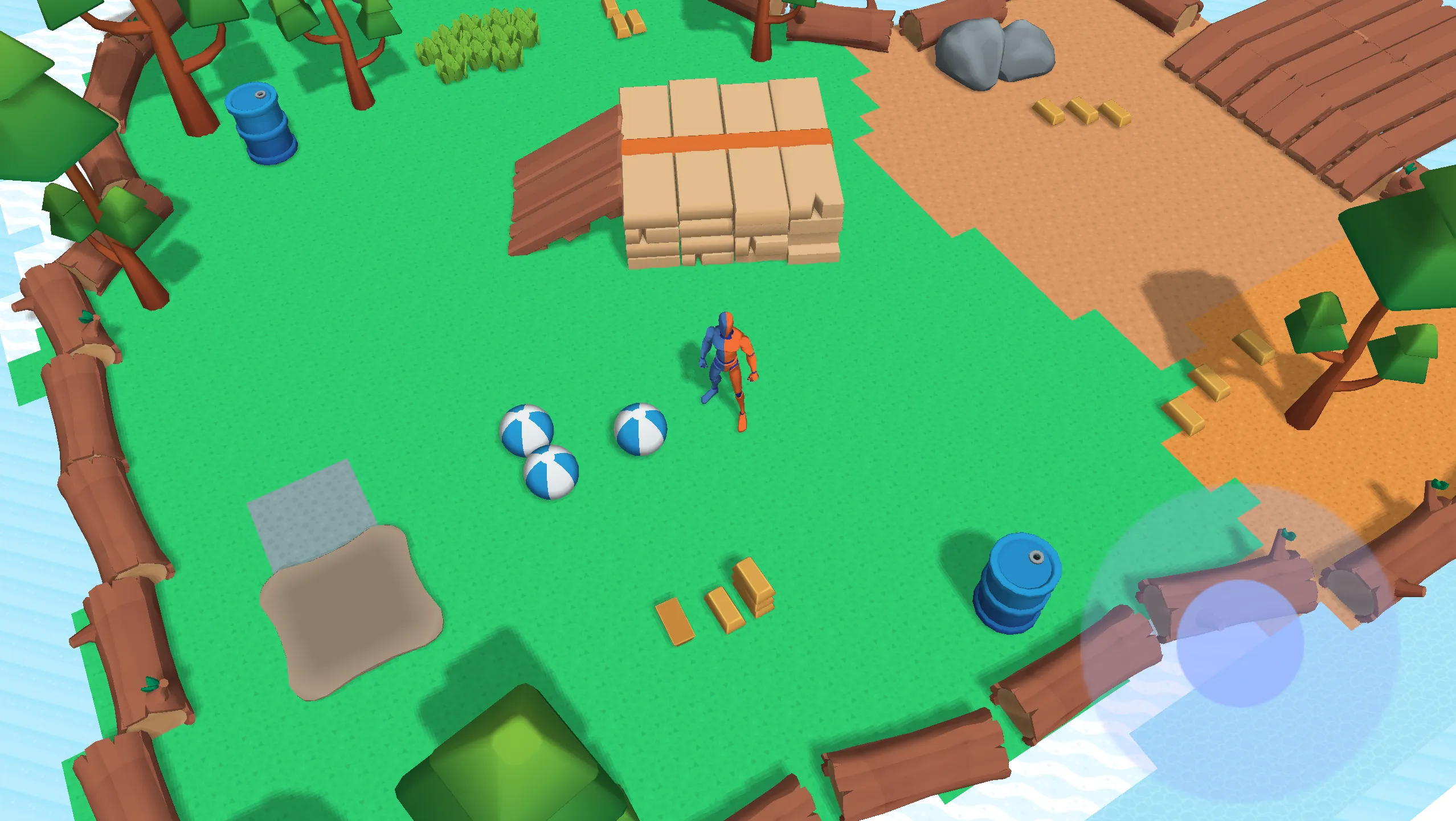
3D playground sample with shadows, multiple control options and base mechanics.
We are updating old tutorials (e.g. the old Astronaut tutorial is now a broader top-down movement tutorial) and adding new ones. For example, we created a dedicated and comprehensive Defold for Unity users guide for people coming from Unity.
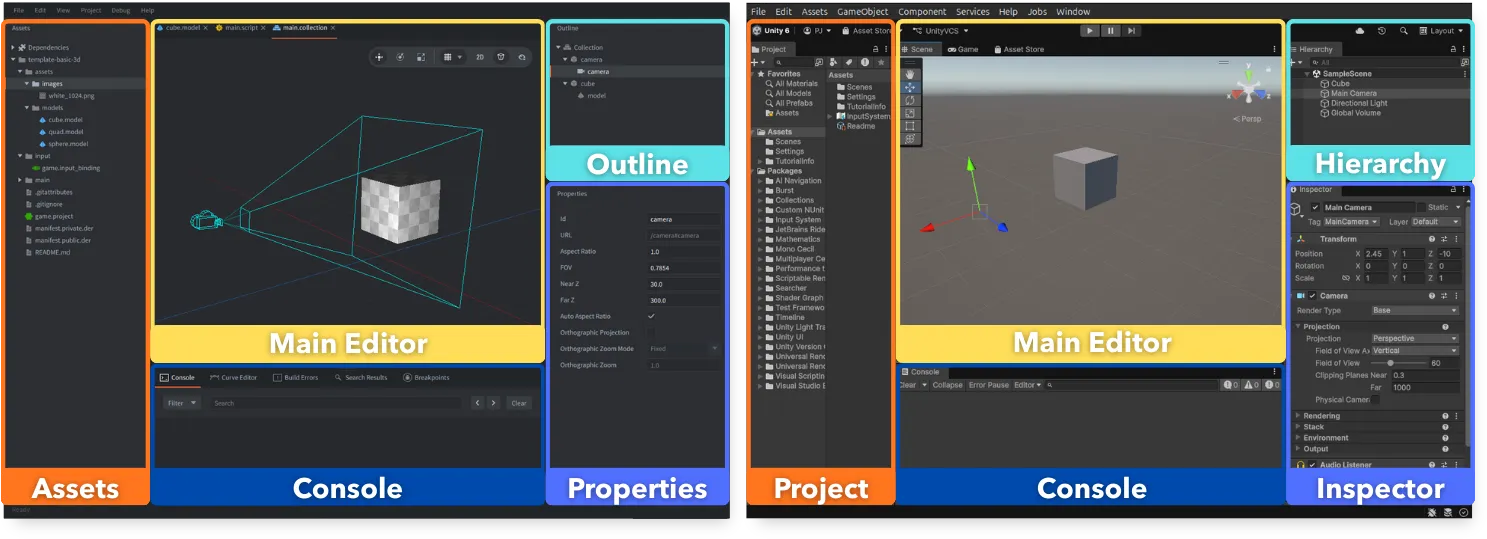
We created a dedicated Defold tutorial for Unity users.
Astonishing Defold community achievements
We are also very happy that more and more games are being made with Defold and released on different platforms. Check out for example Skull Horde, Game of Fitna, Sprint City, Push Titans, Break the Forest, Knight Bolts, Clean-up Crew, Jane’s Fashion Studio, or Throst.
Sprint City by Second Stage Studio, developers of Speedrunners, released in March 2026 in EA on Steam, made with Defold.
We also published several interviews with our community members and developers using Defold:
- Creator Spotlight: Kuyi Mobile
- Power Fantasies - 8BitSkull on Skull Horde and sustainable indie development
- and the interviews mentioned above with Refold on Mad Skills Motocross 2, Fingersoft on Hill Climb Racing Lite, or Orenji Spark on Jane’s Fashion Studio
The community continued to create useful learning material and tools as well. Asatte Games created a top-down island defense video tutorial series for Defold. Sam is creating a great 2D animation tool called SpriteLoop with great integration for Defold. We have new assets like the Biplanar Mapping Shader, WebP native extension, Defold Mic native extension, Asobi multiplayer backend, DefDragon for DragonBones, Live Unbundler, Random Number Generator, and many more. Existing assets also received updates, including Defold Event with Queues and Promises, Graph Pathfinder, Defold A* Pathfinding, DAABBCC, and DAABBCC3D.
We are very proud of our community and very happy that improvements do not only come from Defold engine releases, but also from a community that builds tools, writes examples, shares experiments, publishes postmortems, and helps other developers build and ship their games.
Two new partnerships
We are also very happy that 2026 brought two new important partnerships.
First, 8BitSkull joined the Defold Foundation as a corporate partner. 8BitSkull has used Defold for successful PC and console games such as Fates of Ort, Void Scrappers, Bore Blasters, and Skull Horde. Their support is especially meaningful because it comes from a studio that has been using Defold in real commercial production for years, and we’re very happy that Defold was part of their success!
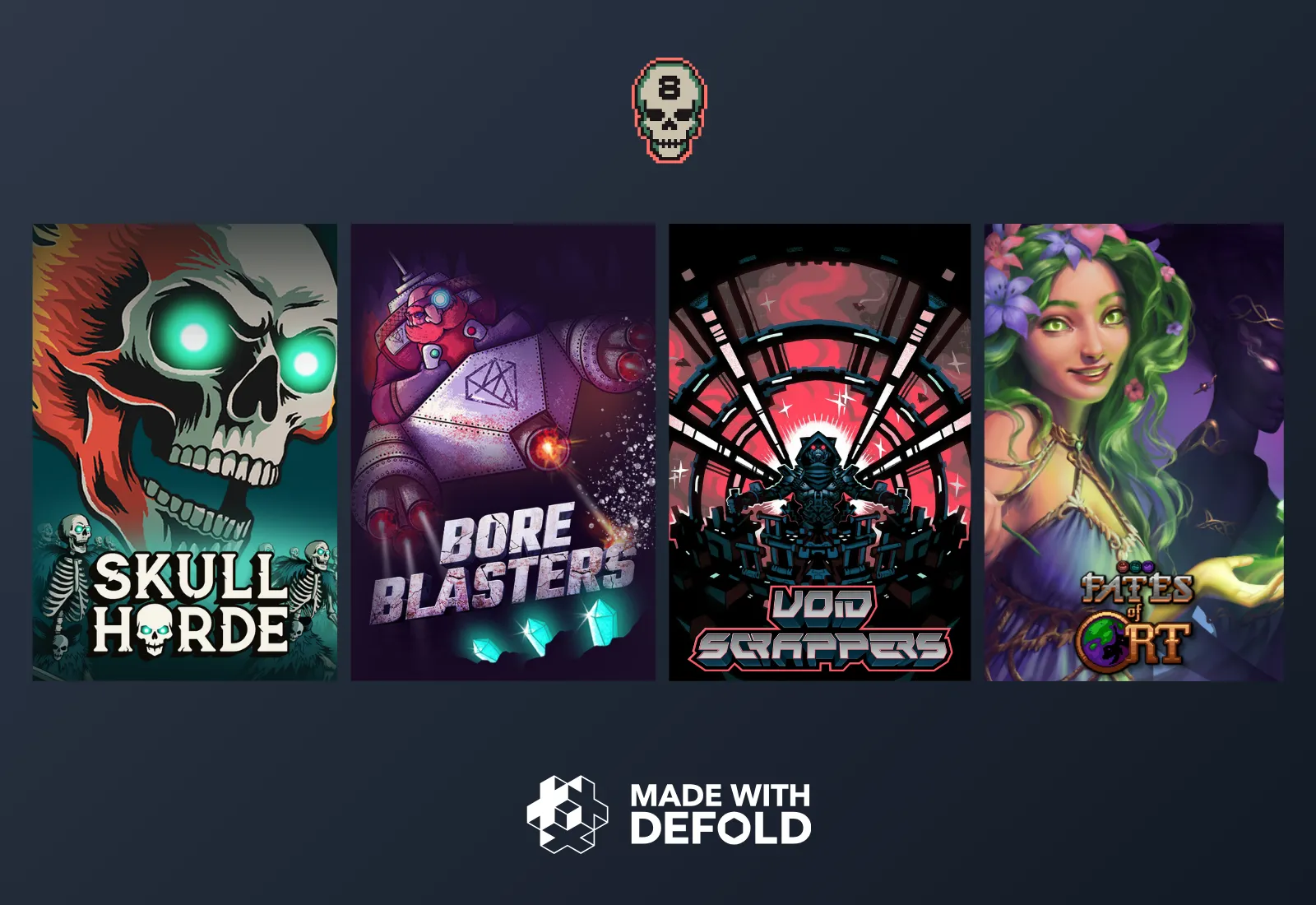
Fates of Ort, Void Scrappers, Bore Blasters, and Skull Horde by 8BitSkull
Second, Wavedash joined the Defold Foundation as a corporate partner. Wavedash is a browser-native gaming platform where players can discover, play, and share games instantly. Alongside the announcement, we’ve created an official Wavedash SDK integration for Defold, so you can start releasing your web games on Wavedash right away! The collaboration will focus on web performance improvements and tighter integrations with the Wavedash platform.

Wavedash, a new browser-native games platform, partners with Defold to bring more games to the web
Together, these partnerships reflect two important parts of Defold’s current position: a strong base of commercial indie developers, and growing recognition of Defold as one of the best engines for fast, lightweight, high-quality web games.
We would also like to thank our existing corporate partners: MoonActive, Rive, Poki, Heroic Labs, and Denda Games for their continued support, and all our contributors and donors helping Defold grow!
A strong first half of 2026
The first half of 2026 moved Defold forward in many ways.
The engine became smaller and cleaner. The editor became faster and more capable, with advanced 3D workflows. Morph targets opened the door to more expressive 3D animation. Box2D scripting gave developers much deeper runtime control over physics. Rendering gained new low-level tools. Live Update became more explicit and predictable. Extensions continued to evolve. More examples, guides, games, and community tools appeared. And two new partnerships strengthened the ecosystem around the engine.
There is still more to do, of course. But the direction described in the 2026 roadmap is already visible in the releases.
The second half of 2026 should be just as exciting. Stay tuned!