
FMOD
FMOD is a cross-platform audio engine by Firelight Technologies with real-time mixing, adaptive music, 3D spatial audio, and runtime parameter control. Sound events are authored in the Studio application and exported as bank files that the engine loads at runtime.
This extension wraps both the Studio and Core APIs for Lua, giving access to the event system, buses, banks, and low-level channel control directly from Defold scripts. It is particularly useful for projects that need dynamic audio beyond simple play/stop, such as vehicle engines that respond to RPM, ambient environments that shift with game state, or music that crossfades between layers based on player action.
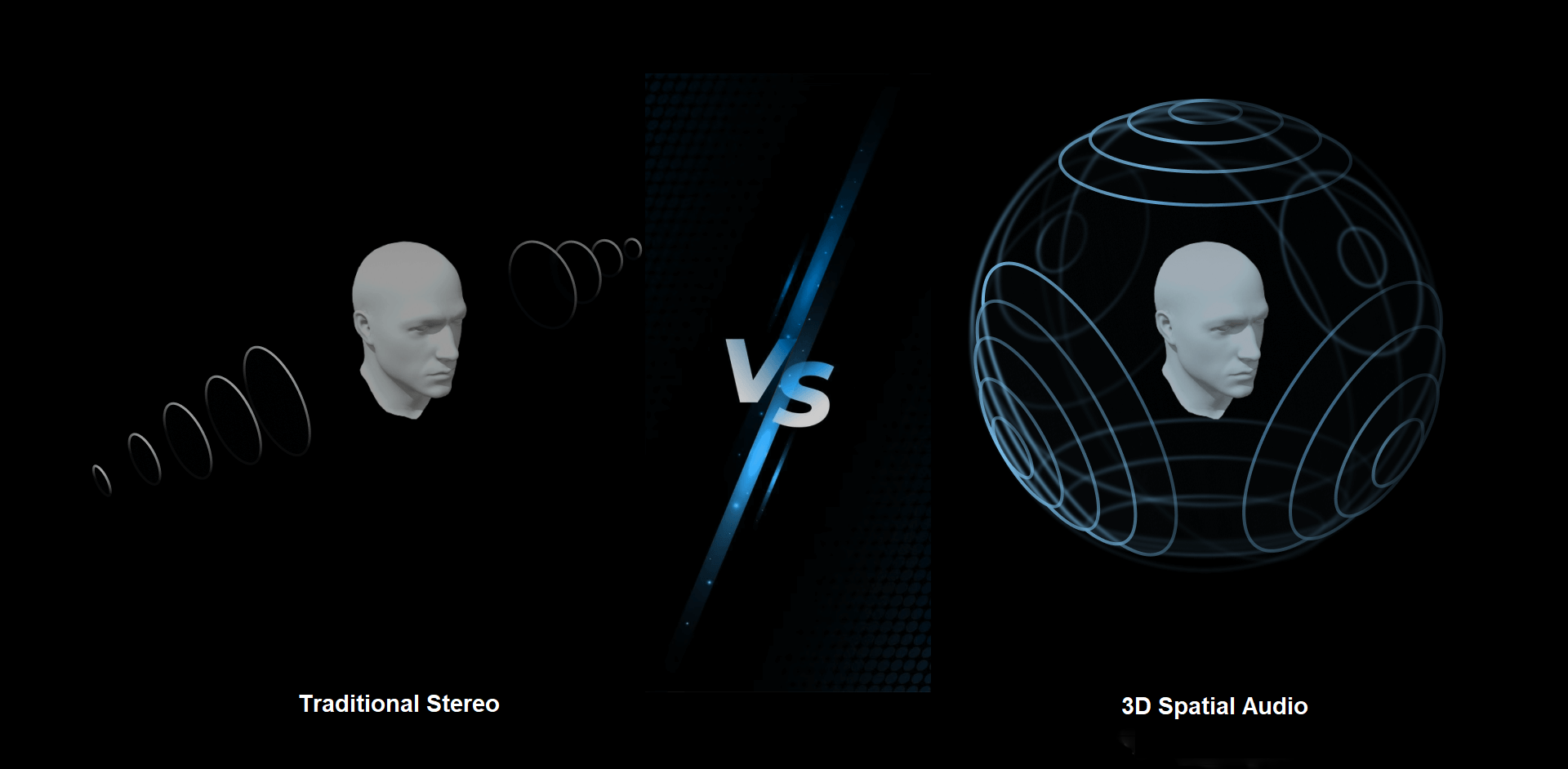
(Source: Agora.io)
Requirements
- Defold 1.11.x or newer
- FMOD Studio to author events and export banks
Licensing
Commercial usage of FMOD requires a license from Firelight Technologies. All products require an in-game credit line including “FMOD” and “Firelight Technologies Pty Ltd”, plus the FMOD logo. See fmod.com/legal and fmod.com/licensing.
Installation
To use FMOD in your Defold project, add the extension URL to your game.project dependencies from Releases. Copy the URL of the ZIP archive for the version you want and add it to the project dependencies
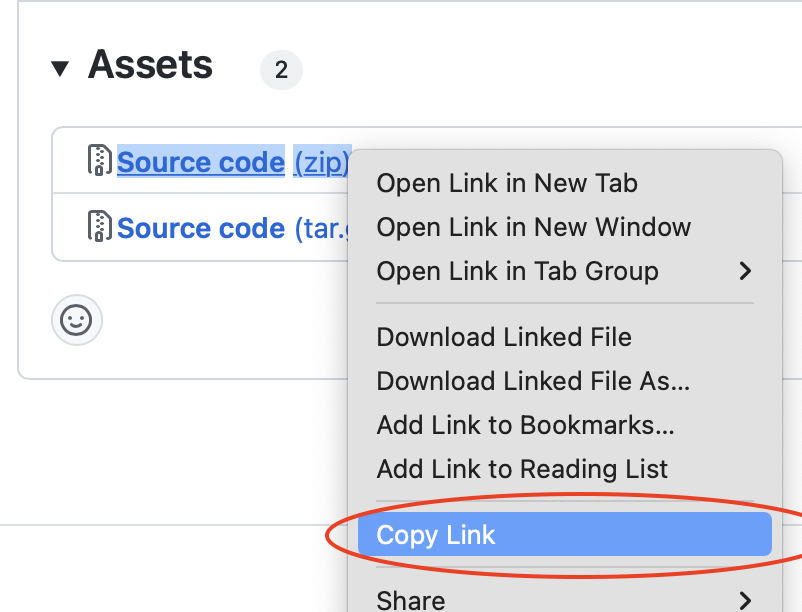
Select Project ▸ Fetch Libraries to download the extension and make it available in your project.
Getting started
Preparing audio in FMOD Studio
You’ll need content from FMOD Studio. In Studio you can create events, which are sound definitions that can have multiple layers, randomisation, effects, and parameter-driven behaviour. Events live inside banks, which are the compiled files your game loads at runtime.
A typical starting workflow:
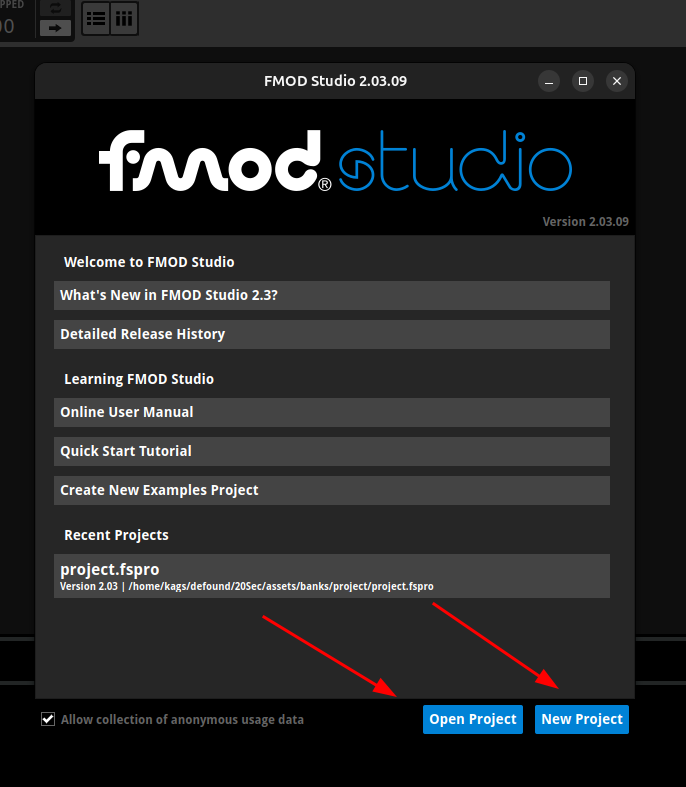
- Create or open project in FMOD Studio
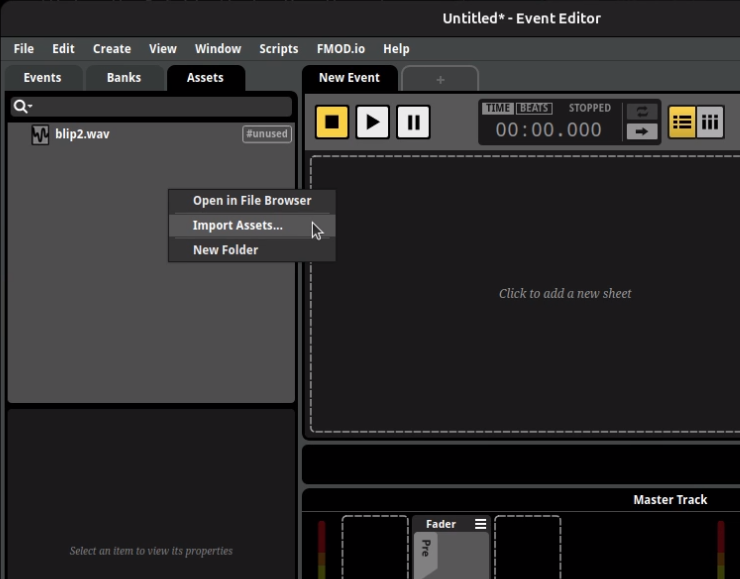
- Import assets via right-click in the Assets tab
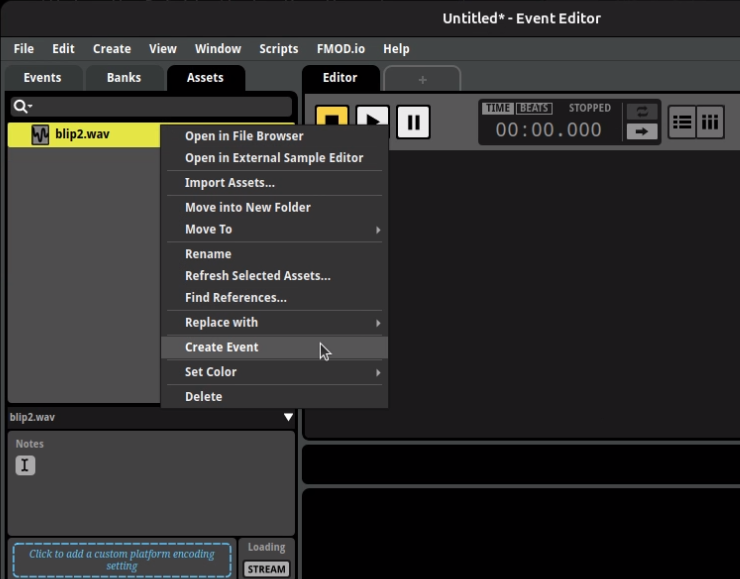
- Create events from assets by right-clicking an asset and selecting Create Event. An event wraps one or more audio files with playback logic, effects, and parameter automation.
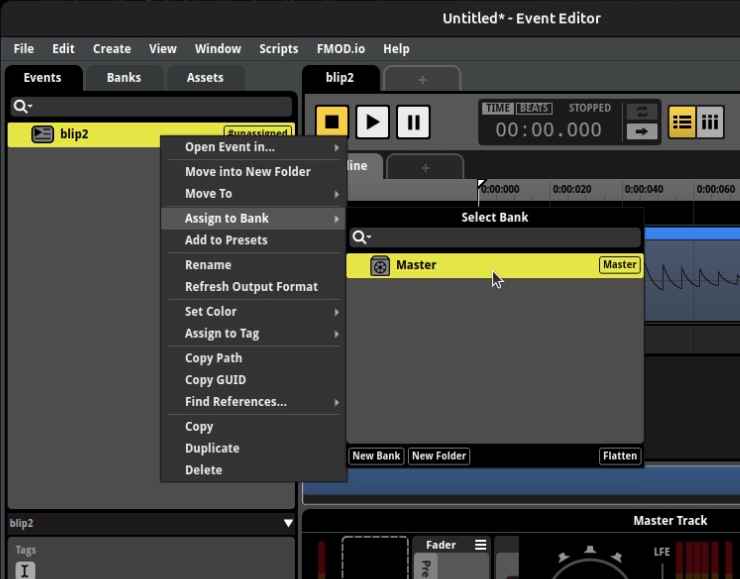
- Assign a bank to those events via right-click on the Events tab. Banks group events for loading at runtime; the default Master bank works to start with.
- Build the project via File ▸ Build to produce
.bankfiles
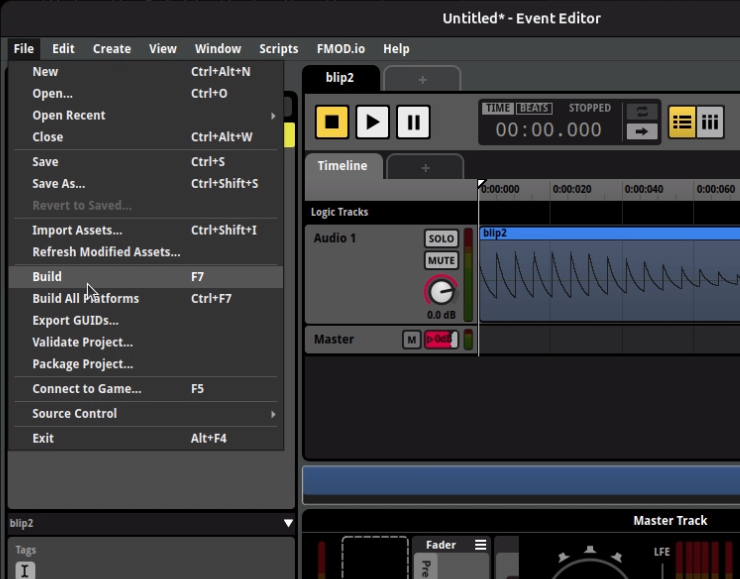
Every build produces at least a Master Bank and a Master Bank.strings bank. The master bank holds global mixer and bus data, while the strings bank maps event paths (like event:/UI/Click) to their internal IDs.
Project setup
-
Place your exported
.bankfiles in your project and add the directory tocustom_resourcesingame.project(this makes banks available viaresource.load()during development; for release builds, see Loading banks from the file system)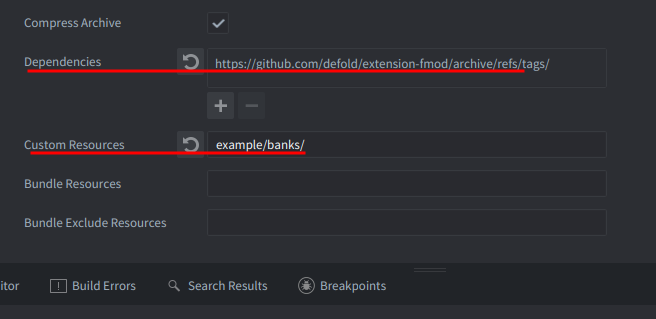
- You always need at least two banks: the Master Bank and the Master Bank.strings bank
- Check that FMOD is available on your platform before calling any API:
if not fmod then
  return
end
Playing your first sound
The extension initialises the FMOD system automatically, so fmod.studio.system is ready by the time your script’s init() runs. Load banks, then create and start an event instance:
function init(self)
  if not fmod then return end

  fmod.studio.system:load_bank_memory(resource.load("/banks/Master Bank.bank"), fmod.STUDIO_LOAD_BANK_NORMAL)
  fmod.studio.system:load_bank_memory(resource.load("/banks/Master Bank.strings.bank"), fmod.STUDIO_LOAD_BANK_NORMAL)

  fmod.studio.system:get_event("event:/UI/Click"):create_instance():start()
end
This loads banks into memory, looks up an event by its Studio path, creates a playback instance, and starts it.
Project configuration
You can configure FMOD settings in the Editor under the FMOD section of game.project:
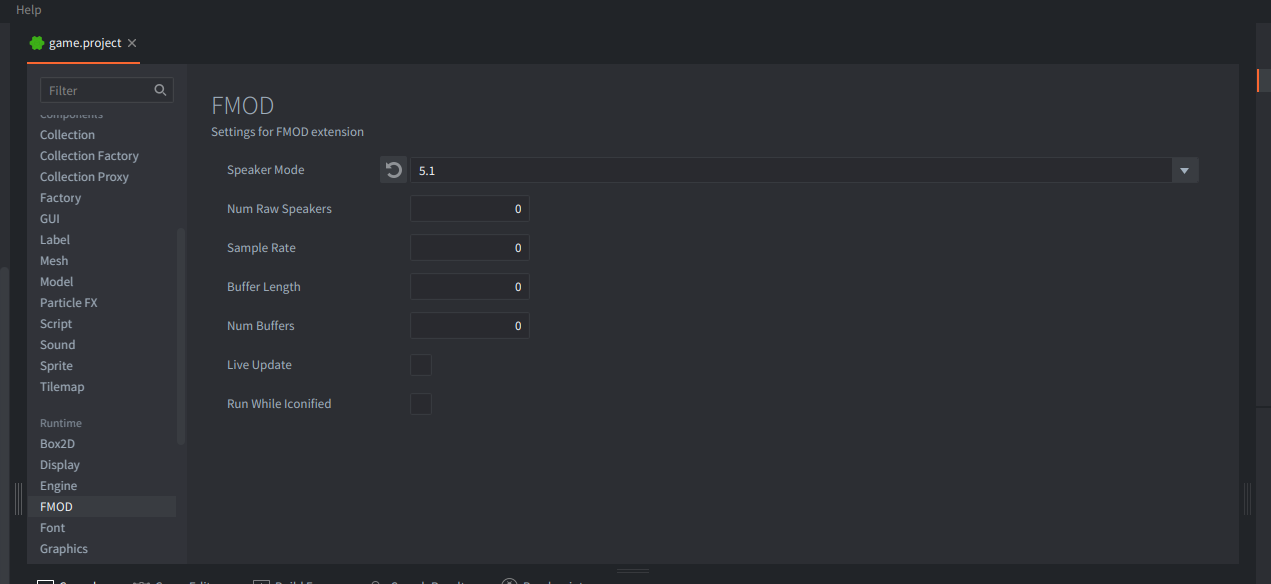
The FMOD section in game.project exposes speaker mode, buffer settings, live update, and more.
Or set them directly via your text editor in the [fmod] section of game.project:
[fmod]
speaker_mode = stereo
buffer_length = 512
num_buffers = 4
live_update = 1
Speaker mode
Sets the output format before FMOD initialises. Most projects need this since Studio banks are mixed at a specific speaker mode. See FMOD_System_SetSoftwareFormat. Supported values for speaker_mode: default, raw, mono, stereo, quad, surround, 5.1, 7.1, max.
You can also set sample_rate and num_raw_speakers in the same section.
Buffer settings
If you have issues with audio stutter, adjust buffer_length and num_buffers. More details on DSP buffer size.
Platform-specific overrides
The following keys support a platform suffix (_macos, _windows, _linux, _android, _ios, _html5, _switch):
speaker_mode, sample_rate, num_raw_speakers, buffer_length, num_buffers, live_update, run_while_iconified
[fmod]
buffer_length = 512
buffer_length_android = 1024
HTML5 heap size
FMOD needs enough memory for banks and sound buffers on HTML5 (particularly Safari on iOS and macOS). load_bank_memory() copies banks into memory, which increases usage. Increase the heap size as needed:
[html5]
heap_size = 512
Loading banks from the file system
Loading from memory with load_bank_memory (as shown in Getting started) uses custom_resources and resource.load(), which is straightforward for development but inefficient for release builds since it copies the entire bank into Lua memory and does not support streaming.
For release builds, use bundled_resources instead. This bundles the files into the application package without loading them into Lua memory. Place your banks at the following paths relative to your bundled_resources directory:
| Platform | Path relative to bundled_resources |
|---|---|
| Windows | win32/banks/ |
| Linux | linux/banks/ |
| macOS | osx/Contents/Resources/banks/ |
| iOS | ios/banks/ |
| Android | android/assets/banks/ |
Then load from the file system:
local bundle_path = sys.get_application_path()
local path_to_banks = bundle_path .. "/banks"
local system_name = sys.get_sys_info().system_name
if system_name == "Darwin" then
  path_to_banks = bundle_path .. "/Contents/Resources/banks"
elseif system_name == "Android" then
  path_to_banks = "file:///android_asset/banks"
end
fmod.studio.system:load_bank_file(path_to_banks .. "/Master Bank.bank", fmod.STUDIO_LOAD_BANK_NORMAL)
For large banks, load asynchronously with fmod.STUDIO_LOAD_BANK_NONBLOCKING and poll bank:get_loading_state() before using the bank’s events.
Tip: Don’t use relative paths for loading banks. Use
sys.get_application_path(). The current working directory is not always the game’s installation directory, especially on macOS and iOS.
Controlling events
Once you have an event instance, you can stop it, release it, and adjust its parameters. You can create multiple instances from the same event description and control each independently. Store instances in your script’s self table so they stay alive across frames.
Stopping events
Events can be stopped immediately or allowed to fade out:
event:stop(fmod.STUDIO_STOP_IMMEDIATE)
event:stop(fmod.STUDIO_STOP_ALLOWFADEOUT)
Releasing events
Event instances stay alive until you call release() or Lua’s garbage collector collects them. Since GC timing is unpredictable, calling release() explicitly gives you deterministic cleanup. For fire-and-forget one-shots, you can call release() right after start() and FMOD will destroy the instance once it finishes playing.
For long-lived events stored on self, stop and release them in final(). Banks should also be unloaded when no longer needed:
function final(self)
  if not fmod then return end
  self.event:stop(fmod.STUDIO_STOP_IMMEDIATE)
  self.event:release()
  self.bank:unload()
end
Parameters
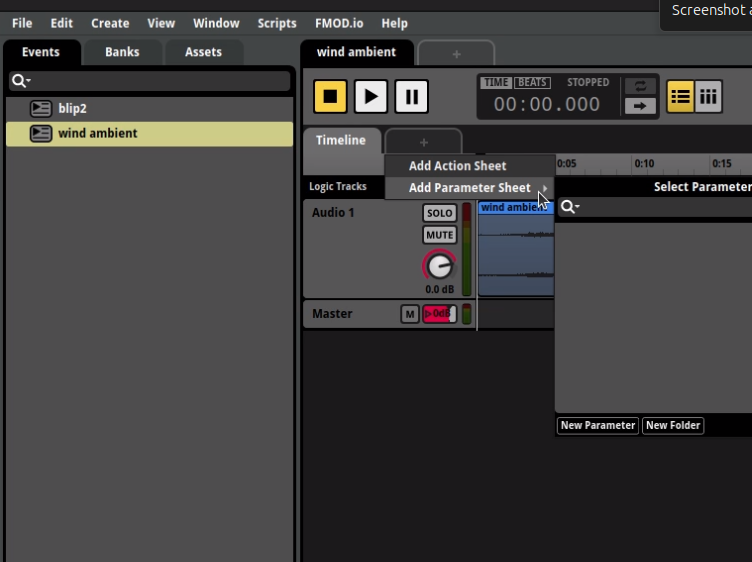
Events can have parameters that control playback behavior, like RPM for engine sounds or intensity for ambience:
event:set_parameter_by_name("RPM", 650.0, false)
The third argument is ignoreseekspeed: when true the value jumps immediately, when false it transitions gradually at the seek speed set in FMOD Studio. Immediate jumps work well for gameplay-driven parameters; gradual transitions suit musical changes.
Parameters marked as global in FMOD Studio affect all instances of events using that parameter, not just one.
Buses and VCAs
Control mix levels through buses and VCAs defined in FMOD Studio:
local music = fmod.studio.system:get_bus("bus:/Music")
music:set_volume(0.5)
music:set_paused(true)

local master_vca = fmod.studio.system:get_vca("vca:/Master")
master_vca:set_volume(0.8)
3D audio
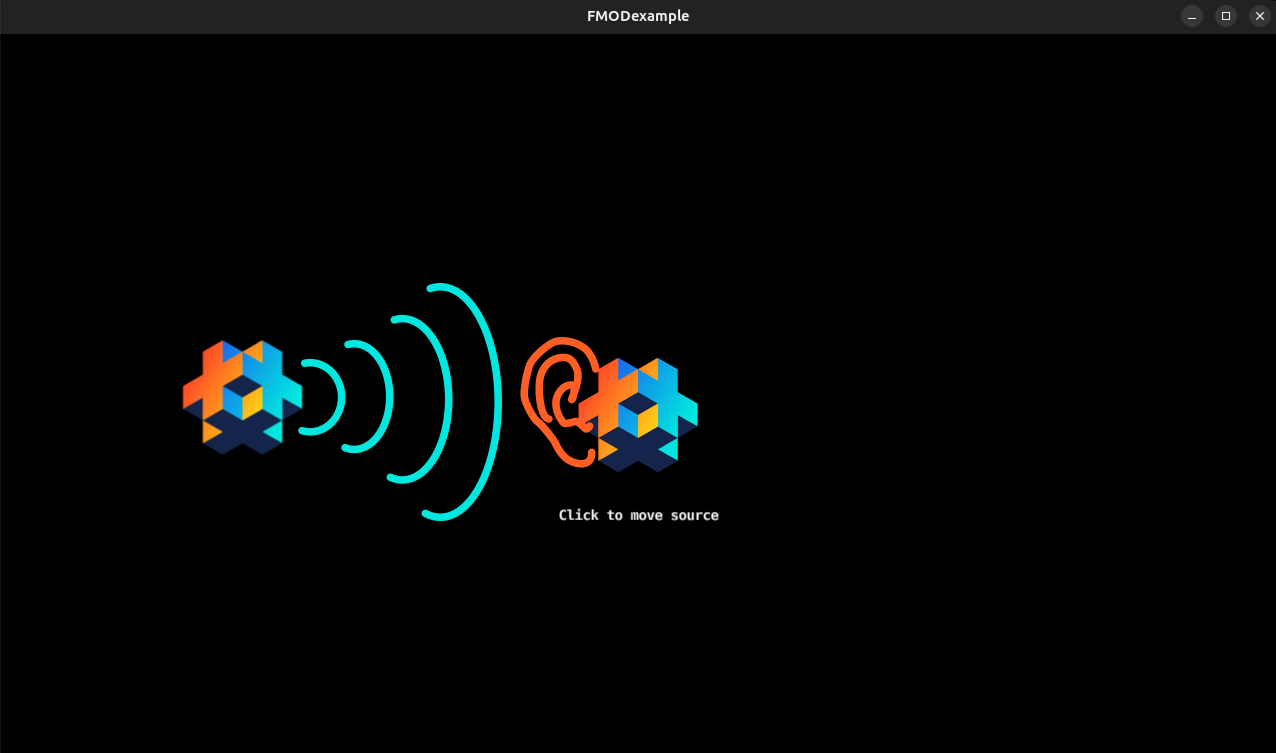
FMOD supports 3D spatial audio with listener and emitter positioning. Set up both the listener (typically the camera or player) and source positions.
Setting up the listener
The listener represents where audio is heard from. Create 3D attributes and update them in your update loop:
local listener_attr = fmod._3D_ATTRIBUTES()
listener_attr.position = go.get_world_position("listener") * world_scale
listener_attr.velocity = vmath.vector3(0.0)
listener_attr.forward = vmath.vector3(0.0, 1.0, 0.0)
listener_attr.up = vmath.vector3(0.0, 0.0, -1.0)
fmod.studio.system:set_listener_attributes(0, listener_attr)
Use a world scale factor (e.g. 0.01) to match FMOD’s coordinate system with Defold’s. FMOD expects distances in meters.
Setting event 3D positions
For 3D audio events, set their position attributes the same way:
local source_attr = fmod._3D_ATTRIBUTES()
source_attr.position = go.get_world_position("source") * world_scale
source_attr.velocity = vmath.vector3(0.0)
source_attr.forward = vmath.vector3(0.0, 1.0, 0.0)
source_attr.up = vmath.vector3(0.0, 0.0, -1.0)
event:set_3d_attributes(source_attr)
Updating positions
Update 3D attributes every frame. Calculate velocity from position delta for Doppler effects:
local function update_attributes(attr, dt, new_position)
  local delta_pos = new_position - attr.position
  attr.position = new_position
  attr.velocity = delta_pos * (1.0 / dt)
end

function update(self, dt)
  if not fmod then return end

  local listener_pos = go.get_world_position("listener") * world_scale
  update_attributes(self.listener_attr, dt, listener_pos)
  fmod.studio.system:set_listener_attributes(0, self.listener_attr)

  local source_pos = go.get_world_position("source") * world_scale
  update_attributes(self.source_attr, dt, source_pos)
  self.event:set_3d_attributes(self.source_attr)
end
For a full working example, see the example script.
Error handling
You can retrieve the error code of an FMOD error for more specific handling:
local ok, err = pcall(function()
  return fmod.studio.system:get_event("event:/Inexistent event")
end)
if ok then
  local event_description = err
  event_description:create_instance():start()
else
  local code = fmod.error_code[err]
  if code == fmod.ERR_EVENT_NOTFOUND then
    print("Event not found")
  end
end
To enable FMOD’s internal logging, call fmod.debug_initialize() early in your project. See the FMOD documentation for flag options.
API conventions
Structs and classes are exposed on the fmod and fmod.studio namespaces. Method names are converted from camelCase to snake_case. Methods that return values through pointer arguments in C++ return the values directly in Lua and throw a Lua error when their result is not FMOD_OK.
Enums are exposed on the fmod table without the leading FMOD_ (e.g. FMOD_STUDIO_PLAYBACK_PLAYING becomes fmod.STUDIO_PLAYBACK_PLAYING).
A fully initialised FMOD::Studio::System is exposed as fmod.studio.system and the corresponding low-level FMOD::System as fmod.system.
You can use vmath.vector3 instead of FMOD_VECTOR. The extension handles the conversion.
The extension calls fmod.studio.system:update() from native code each frame, so you never need to call it manually.
64-bit values
A small number of FMOD functions and structs work with 64-bit number types. Lua 5.1 does not have a native 64-bit type. Functions with 64-bit arguments accept regular Lua numbers if the extra precision is not needed, but for full precision use fmod.s64() and fmod.u64().
Functions that return 64-bit numbers return instances of fmod.s64 or fmod.u64:
x = fmod.s64(num)         -- Convert a Lua number (up to 52 bits of integer precision)
x = fmod.s64(low, high)   -- Create from two 32-bit integers
x.value                   -- Best-effort conversion to a Lua number
x.low                     -- Lowest 32 bits as an unsigned int
x.high                    -- Highest 32 bits as an unsigned int
tostring(x)               -- Converts to a numeric string