

This translation is community contributed and may not be up to date. We only maintain the English version of the documentation. Read this manual in English
サウンド
Defold のサウンド実装はシンプルでありながら強力です。理解しておく必要がある概念は2つだけです。
- サウンドコンポーネント(sound component)
- 再生する実際のサウンドを含み、そのサウンドを再生できるコンポーネント(component)です。
- サウンドグループ(sound group)
- 各サウンドコンポーネントが所属する グループ を指定できます。グループを使うと、関連するサウンドをまとめて直感的に管理できます。たとえば、
sound_fxというグループを用意すると、簡単な関数呼び出しで、そのグループに属するサウンドの音量を下げられます。
サウンドコンポーネントの作成
サウンドコンポーネントは、ゲームオブジェクト(game object)内に直接インスタンス化することしかできません。新しいゲームオブジェクトを作成し、右クリックして Add Component ▸ Sound を選択し、OK を押します。
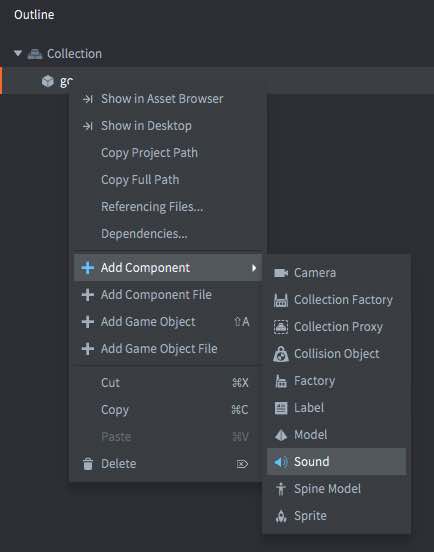
作成したコンポーネントには、設定する必要がある次のプロパティがあります。
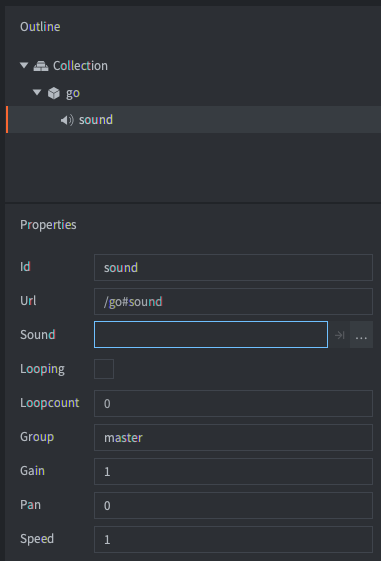
- Sound
- プロジェクト内のサウンドファイルを設定します。ファイルは Wave、Ogg Vorbis、Ogg Opus のいずれかの形式にする必要があります。Defold は8ビットおよび16ビットの PCM Wave ファイルに対応しています。Ogg Opus の再生はオプション機能で、アプリマニフェスト の Include Sound Decoder: Opus が必要です。Opus デコーダーはデフォルトでは含まれていません。
- Looping
- チェックすると、サウンドを Loopcount 回、または明示的に停止するまで再生します。
- Loopcount
- ループ再生するサウンドが停止するまでの再生回数です(0は、明示的に停止するまでループ再生することを意味します)。
- Group
- サウンドが所属するサウンドグループの名前です。このプロパティを空のままにすると、サウンドは組み込みの
masterグループに割り当てられます。 - Gain
- サウンドのゲイン(gain)をコンポーネントで直接設定できます。これにより、サウンド制作ソフトウェアに戻って再エクスポートすることなく、サウンドのゲインを調整できます。ゲインの計算方法については、以下を参照してください。
- Pan
- サウンドのパン(pan)の値をコンポーネントで直接設定できます。パンは -1(左45度)から1(右45度)までの値にする必要があります。
- Speed
- サウンドの再生速度をコンポーネントで直接設定できます。1.0は通常の速度、0.5は半分の速度、2.0は2倍の速度です。
サウンドの再生
サウンドコンポーネントを正しく設定したら、sound.play() を呼び出してサウンドを再生できます。
sound.play("go#sound", {delay = 1, gain = 0.5, pan = -1.0, speed = 1.25})
サウンドコンポーネントが所属していたゲームオブジェクトを削除しても、サウンドの再生は続きます。sound.stop() を呼び出すと、サウンドを停止できます(以下を参照)。
コンポーネントにメッセージを送信するたびに、そのサウンドの別のインスタンスが再生されます。使用可能なサウンドバッファーがいっぱいになると、エンジンはコンソールにエラーを出力します。何らかのゲーティング(gating)とサウンドのグループ化の仕組みを実装することをお勧めします。
サウンドの停止
サウンドの再生を停止するには、sound.stop() を呼び出します。
sound.stop("go#sound")
ゲイン

サウンドシステムには、4段階のゲインがあります。
- サウンドコンポーネントに設定されたゲイン。
sound.play()の呼び出しによってサウンドの再生を開始するときに設定されたゲイン、またはsound.set_gain()の呼び出しによってボイスのゲインを変更するときに設定されたゲイン。sound.set_group_gain()関数の呼び出しによってグループに設定されたゲイン。masterグループに設定されたゲイン。これはsound.set_group_gain(hash("master"), gain)で変更できます。
Sound のプロジェクト設定 で Use Linear Gain が有効な場合(デフォルト)、出力ゲインはこれら4つのゲインを掛け合わせた結果になります。ゲイン 1.0 はユニティゲイン(0 dB)です。リニアゲインが無効な場合、Defold はミキシング時に非線形のカーブを適用するため、4つのゲインをそのまま掛け合わせる計算や、以下のデシベルへの変換は、実際の出力レベルを表しません。
サウンドグループ
サウンドグループ名が指定されたサウンドコンポーネントは、その名前のサウンドグループに入ります。グループを指定しない場合、サウンドは master グループに割り当てられます。サウンドコンポーネントのグループを明示的に master に設定することもでき、同じ効果があります。
利用可能なすべてのグループや文字列の名前の取得、ゲインの取得と設定、rms(http://en.wikipedia.org/wiki/Root_mean_square を参照)とピークゲインの取得のために、いくつかの関数が用意されています。対象デバイスの音楽プレーヤーが動作しているかどうかを確認できる関数もあります。
-- If sound playing on this iPhone/Android device, silence everything
if sound.is_music_playing() then
    for i, group_hash in ipairs(sound.get_groups()) do
        sound.set_group_gain(group_hash, 0)
    end
end
グループはハッシュ値で識別されます。文字列の名前は sound.get_group_name() で取得できます。この関数を使うと、グループのレベルをテストするミキサーなどの開発ツールにグループ名を表示できます。
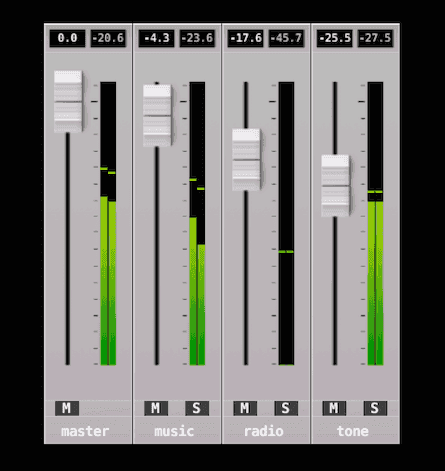
サウンドグループの文字列の値はリリースビルドでは利用できないため、その値に依存するコードを書かないでください。
Use Linear Gain が有効な場合、標準の式を使って正のゲイン値をデシベルに変換します。
db = 20 \times \log \left( gain \right)
for i, group_hash in ipairs(sound.get_groups()) do
    -- The name string is only available in debug. Returns "unknown_*" in release.
    local name = sound.get_group_name(group_hash)
    local gain = sound.get_group_gain(group_hash)

    -- Convert to decibel.
    local db = 20 * math.log10(gain)

    -- Get RMS (gain Root Mean Square). Left and right channel separately.
    local left_rms, right_rms = sound.get_rms(group_hash, 2048 / 65536.0)
    left_rmsdb = 20 * math.log10(left_rms)
    right_rmsdb = 20 * math.log10(right_rms)

    -- Get gain peak. Left and right separately.
    left_peak, right_peak = sound.get_peak(group_hash, 2048 * 10 / 65536.0)
    left_peakdb = 20 * math.log10(left_peak)
    right_peakdb = 20 * math.log10(right_peak)
end

-- Set the master gain to +6 dB (math.pow(10, 6/20)).
sound.set_group_gain("master", 1.995)
Defold 1.10.2では、サウンドミキサーで長年発生していた約3 dB の減衰が修正されました。古いプロジェクトでこの減衰を補うようにミックスを調整していたため、アップグレード後に音量が大きくなった場合は、全体の Sound ▸ Gain 設定または影響を受けるグループのゲインを再調整してください。
サウンドのゲーティング
ゲーム内でイベントに応じて同じサウンドを再生し、そのイベントが頻繁に発生する場合、同じサウンドをほぼ同時に2回以上再生するおそれがあります。この場合、サウンドの 位相がずれ、非常に目立つ音の乱れが生じることがあります。
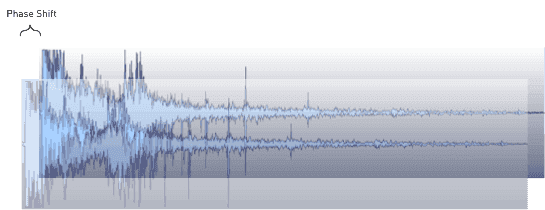
この問題に対処する最も簡単な方法は、サウンドのメッセージをフィルタリングするゲートを作り、指定した時間間隔内に同じサウンドが2回以上再生されないようにすることです。
-- Don't allow the same sound to be played within "gate_time" interval.
local gate_time = 0.3

function init(self)
    -- Store played sound timers in a table and count down each frame until they have been
    -- in the table for "gate_time" seconds. Then remove them.
    self.sounds = {}
end

function update(self, dt)
    -- Count down the stored timers
    for k,_ in pairs(self.sounds) do
        self.sounds[k] = self.sounds[k] - dt
        if self.sounds[k] < 0 then
            self.sounds[k] = nil
        end
    end
end

function on_message(self, message_id, message, sender)
    if message_id == hash("play_gated_sound") then
        -- Only play sounds that are not currently in the gating table.
        if self.sounds[message.soundcomponent] == nil then
            -- Store sound timer in table
            self.sounds[message.soundcomponent] = gate_time
            -- Play the sound
            sound.play(message.soundcomponent, { gain = message.gain })
        else
            -- An attempt to play a sound was gated
            print("gated " .. message.soundcomponent)
        end
    end
end
ゲートを使用するには、対象のサウンドコンポーネントとサウンドのゲインを指定した play_gated_sound メッセージを送信します。ゲートが開いている場合、対象のサウンドコンポーネントを指定して sound.play() が呼び出されます。
msg.post("/sound_gate#script", "play_gated_sound", { soundcomponent = "/sounds#explosion1", gain = 1.0 })
ゲートで play_sound メッセージを受信する方法は機能しません。この名前は Defold エンジンによって予約されているためです。予約済みのメッセージ名を使用すると、予期しない動作が発生します。
実行時の操作
さまざまなプロパティを通じて、実行時にサウンドを操作できます(使用方法は API ドキュメント を参照してください)。次のプロパティは、go.get() と go.set() を使って操作できます。
gain- サウンドコンポーネントのゲインです(
number)。 pan- サウンドコンポーネントのパンです(
number)。パンは -1(左45度)から1(右45度)までの値にする必要があります。 speed- サウンドコンポーネントの再生速度です(
number)。1.0は通常の速度、0.5は半分の速度、2.0は2倍の速度です。 sound- サウンドへのリソースパス(resource path)です(
hash)。このリソースパスを使って、resource.set_sound(path, buffer)でサウンドを変更できます。例:
local boom = sys.load_resource("/sounds/boom.wav")
local path = go.get("#sound", "sound")
resource.set_sound(path, boom)
プロジェクトの設定
game.project ファイルには、サウンドコンポーネントに関連するプロジェクト設定がいくつかあります。
サウンドのストリーミング
サウンドのストリーミングにも対応できます。