

Manuals
Manuals
- Overview
- Scene Editing
- Code editor
- Custom project templates
- Editor scripts
- Editor scripts: UI
- Debugger
- Preferences
- Refactoring
- Styling
- Importing assets
- Caching assets
- Importing 2D graphics
- Importing 3D models
- Adapting to different screen sizes
- Live update
- Atlas
- Buffer
- Font
- Resource management
- Tile source
- Texture filtering
- Texture compression
- Overview
- Flipbook Animation
- Model animation
- Property animation (tweens)
- Rive animation (English)
- Spine animation (English)
- Overview
- Collection factory
- Collection proxy
- Collision object
- Camera
- Factory
- Label
- Light
- Mesh
- Model
- Particle FX
- Rive (English)
- Sound
- Spine (English)
- Sprite
- Tilemap
- GUI overview
- Box nodes
- Text nodes
- Pie nodes
- Spine nodes (English)
- ParticleFX nodes
- Template nodes
- Scripts
- Clipping
- Layouts
- Physics overview
- Collision objects
- Collision shapes
- Collision groups
- Collision messages
- Collision events listener
- Resolving collisions
- Ray casts
- Joints and constraints
- Scripts
- Properties
- Script properties
- Lua in Defold
- Source code obfuscation
- Modules
- Debugging
- Writing code
- Application security
- Bundling an application
- Caching assets
- Command line tools
- Hot reloading
- Porting guidelines
- Refactoring
- The mobile dev app
- Version control
- Writing code
- Working offline
- Debugging game logic
- Debugging native code
- Debugging native code on Android
- Debugging native code on iOS
- Reading game and system logs
- Optimizing an application
- Optimize game size
- Optimize runtime performance
- Optimize battery usage
- Optimize memory usage
- Profiling
- Introduction
- Advertising Info (English)
- AdMob ads (English)
- Android Device Performance Framework (English)
- App review and ratings (English)
- AppLovin MAX ad mediation (English)
- Camera (English)
- Facebook (English)
- Firebase Analytics (English)
- Firebase Remote Config (English)
- Google Play Game Services (English)
- Google Play Instant (English)
- Inter-app communication
- LevelPlay ad mediation (English)
- Push notifications (English)
- Play Asset Delivery (English)
- Safe Area (English)
- Webview (English)
- The mobile dev app
- Introduction
- Advertising Info (English)
- AdMob ads (English)
- App review and ratings (English)
- AppLovin MAX ad mediation (English)
- Camera (English)
- Facebook (English)
- Firebase Analytics (English)
- Firebase Remote Config (English)
- Inter-app communication
- LevelPlay ad mediation (English)
- Push notifications (English)
- Safe Area (English)
- Webview (English)
- The mobile dev app
- Introduction
- CrazyGames (English)
- Facebook (English)
- Facebook Instant Games (English)
- Poki (English)
- Wavedash (English)
Browse manuals エディターのテンプレート
Getting Started
Project Setup
Editor
Core Concepts
Assets and Resources
Animations
Components
GUI
Fonts and text
Physics
Game logic
Files
Network Connections
Workflow
Debugging
Optimization
Monetization
Android
- Introduction
- Advertising Info (English)
- AdMob ads (English)
- Android Device Performance Framework (English)
- App review and ratings (English)
- AppLovin MAX ad mediation (English)
- Camera (English)
- Facebook (English)
- Firebase Analytics (English)
- Firebase Remote Config (English)
- Google Play Game Services (English)
- Google Play Instant (English)
- Inter-app communication
- LevelPlay ad mediation (English)
- Push notifications (English)
- Play Asset Delivery (English)
- Safe Area (English)
- Webview (English)
- The mobile dev app
iOS
- Introduction
- Advertising Info (English)
- AdMob ads (English)
- App review and ratings (English)
- AppLovin MAX ad mediation (English)
- Camera (English)
- Facebook (English)
- Firebase Analytics (English)
- Firebase Remote Config (English)
- Inter-app communication
- LevelPlay ad mediation (English)
- Push notifications (English)
- Safe Area (English)
- Webview (English)
- The mobile dev app
HTML5
This translation is community contributed and may not be up to date. We only maintain the English version of the documentation. Read this manual in English
エディターのテンプレート
New Project ウィンドウに独自のカスタムプロジェクトテンプレート(project template)を追加できます。
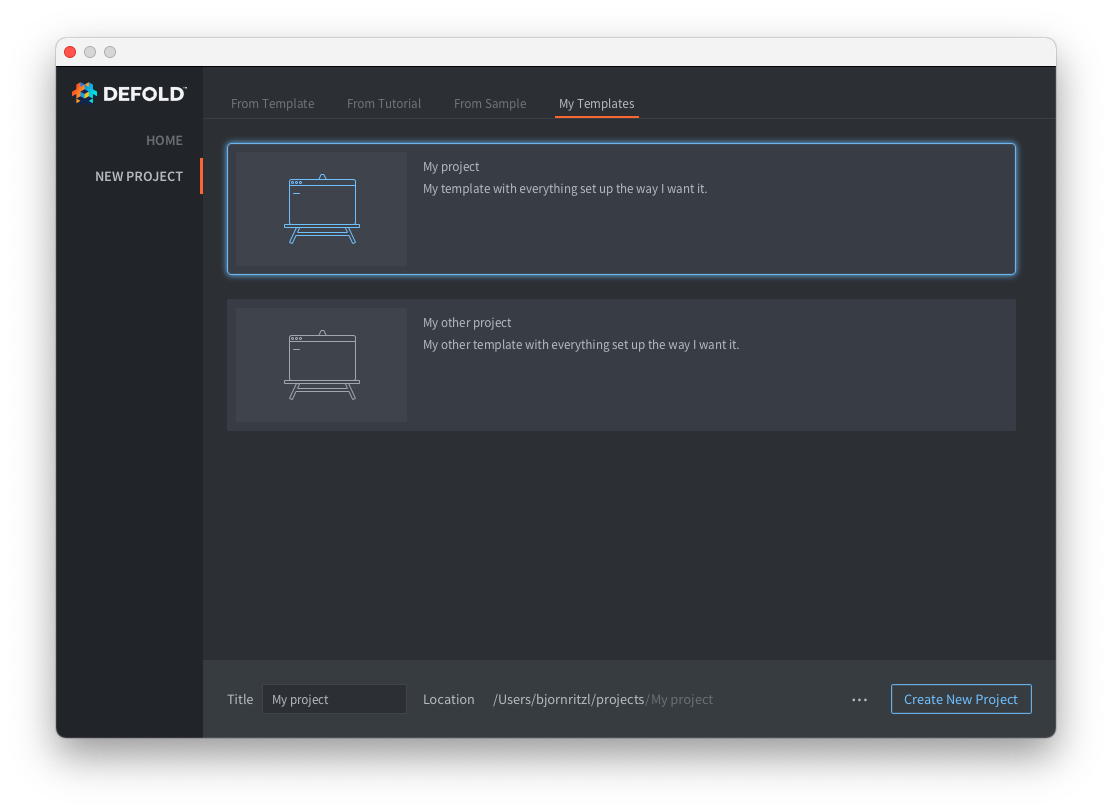
カスタムプロジェクトテンプレートを含む新しいタブを1つ以上追加するには、ユーザーのホームディレクトリ内の .defold フォルダーに welcome.edn ファイルを追加する必要があります。
- ユーザーのホームディレクトリに
.defoldという名前のフォルダーを作成します。- Windows では
C:\Users\**Your Username**\.defold - macOS では
/Users/**Your Username**/.defold - Linux では
~/.defold
- Windows では
.defoldフォルダーにwelcome.ednファイルを作成します。
welcome.edn ファイルは Extensible Data Notation 形式を使用します。次に例を示します。
{:new-project
  {:categories [
    {:label "My Templates"
     :templates [
          {:name "My project"
           :description "My template with everything set up the way I want it."
           :image "empty.svg"
           :zip-url "https://github.com/britzl/template-project/archive/master.zip"
           :skip-root? true},
          {:name "My other project"
           :description "My other template with everything set up the way I want it."
           :image "empty.svg"
           :zip-url "https://github.com/britzl/template-other-project/archive/master.zip"
           :skip-root? true}]
    }]
  }
}
これにより、上のスクリーンショットに示したテンプレートの一覧が作成されます。
テンプレートの画像には、エディターに同梱されている画像のみ使用できます。
Did you spot an error or do you have a suggestion? Please let us know on GitHub!
GITHUB