

Manuals
Manuals
- Overview
- Scene Editing
- Code editor
- Custom project templates
- Editor scripts
- Editor scripts: UI
- Debugger
- Preferences
- Refactoring
- Styling
- Importing assets
- Caching assets
- Importing 2D graphics
- Importing 3D models
- Adapting to different screen sizes
- Live update
- Atlas
- Buffer
- Font
- Resource management
- Tile source
- Texture filtering
- Texture compression
- Overview
- Flipbook Animation
- Model animation
- Property animation (tweens)
- Rive animation (English)
- Spine animation (English)
- Overview
- Collection factory
- Collection proxy
- Collision object
- Camera
- Factory
- Label
- Light
- Mesh
- Model
- Particle FX
- Rive (English)
- Sound
- Spine (English)
- Sprite
- Tilemap
- GUI overview
- Box nodes
- Text nodes
- Pie nodes
- Spine nodes (English)
- ParticleFX nodes
- Template nodes
- Scripts
- Clipping
- Layouts
- Physics overview
- Collision objects
- Collision shapes
- Collision groups
- Collision messages
- Collision events listener
- Resolving collisions
- Ray casts
- Joints and constraints
- Scripts
- Properties
- Script properties
- Lua in Defold
- Source code obfuscation
- Modules
- Debugging
- Writing code
- Application security
- Bundling an application
- Caching assets
- Command line tools
- Hot reloading
- Porting guidelines
- Refactoring
- The mobile dev app
- Version control
- Writing code
- Working offline
- Debugging game logic
- Debugging native code
- Debugging native code on Android
- Debugging native code on iOS
- Reading game and system logs
- Optimizing an application
- Optimize game size
- Optimize runtime performance
- Optimize battery usage
- Optimize memory usage
- Profiling
- Introduction
- Advertising Info (English)
- AdMob ads (English)
- Android Device Performance Framework (English)
- App review and ratings (English)
- AppLovin MAX ad mediation (English)
- Camera (English)
- Facebook (English)
- Firebase Analytics (English)
- Firebase Remote Config (English)
- Google Play Game Services (English)
- Google Play Instant (English)
- Inter-app communication
- LevelPlay ad mediation (English)
- Push notifications (English)
- Play Asset Delivery (English)
- Safe Area (English)
- Webview (English)
- The mobile dev app
- Introduction
- Advertising Info (English)
- AdMob ads (English)
- App review and ratings (English)
- AppLovin MAX ad mediation (English)
- Camera (English)
- Facebook (English)
- Firebase Analytics (English)
- Firebase Remote Config (English)
- Inter-app communication
- LevelPlay ad mediation (English)
- Push notifications (English)
- Safe Area (English)
- Webview (English)
- The mobile dev app
- Introduction
- CrazyGames (English)
- Facebook (English)
- Facebook Instant Games (English)
- Poki (English)
- Wavedash (English)
Browse manuals Defold の GUI パイノード
Getting Started
Project Setup
Editor
Core Concepts
Assets and Resources
Animations
Components
GUI
Fonts and text
Physics
Game logic
Files
Network Connections
Workflow
Debugging
Optimization
Monetization
Android
- Introduction
- Advertising Info (English)
- AdMob ads (English)
- Android Device Performance Framework (English)
- App review and ratings (English)
- AppLovin MAX ad mediation (English)
- Camera (English)
- Facebook (English)
- Firebase Analytics (English)
- Firebase Remote Config (English)
- Google Play Game Services (English)
- Google Play Instant (English)
- Inter-app communication
- LevelPlay ad mediation (English)
- Push notifications (English)
- Play Asset Delivery (English)
- Safe Area (English)
- Webview (English)
- The mobile dev app
iOS
- Introduction
- Advertising Info (English)
- AdMob ads (English)
- App review and ratings (English)
- AppLovin MAX ad mediation (English)
- Camera (English)
- Facebook (English)
- Firebase Analytics (English)
- Firebase Remote Config (English)
- Inter-app communication
- LevelPlay ad mediation (English)
- Push notifications (English)
- Safe Area (English)
- Webview (English)
- The mobile dev app
HTML5
This translation is community contributed and may not be up to date. We only maintain the English version of the documentation. Read this manual in English
GUI パイノード
パイノード(pie node)は、単純な円から扇形や四角いドーナツ形まで、円形または楕円形のオブジェクトを作成するために使用します。
パイノードの作成
Outline の Nodes セクションを 右クリック し、Add ▸ Pie を選択します。新しいパイノードが選択され、そのプロパティを変更できます。
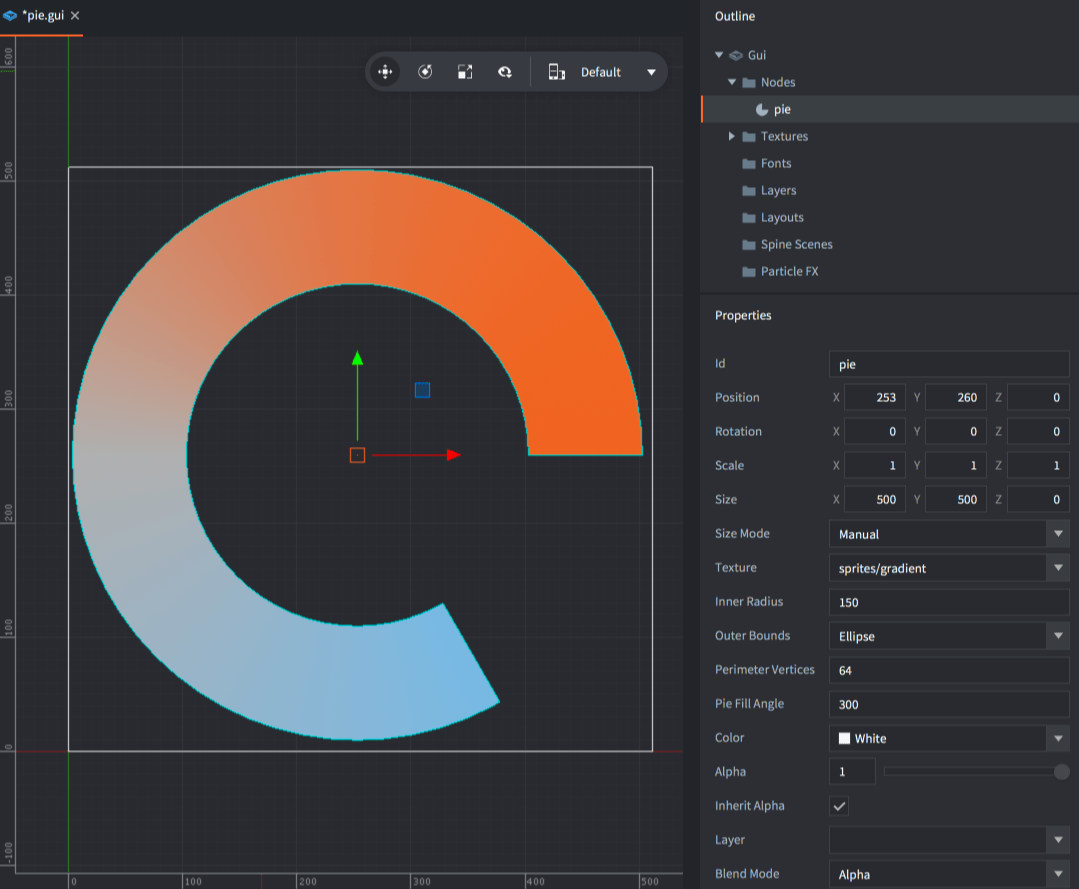
パイノード固有のプロパティは次のとおりです。
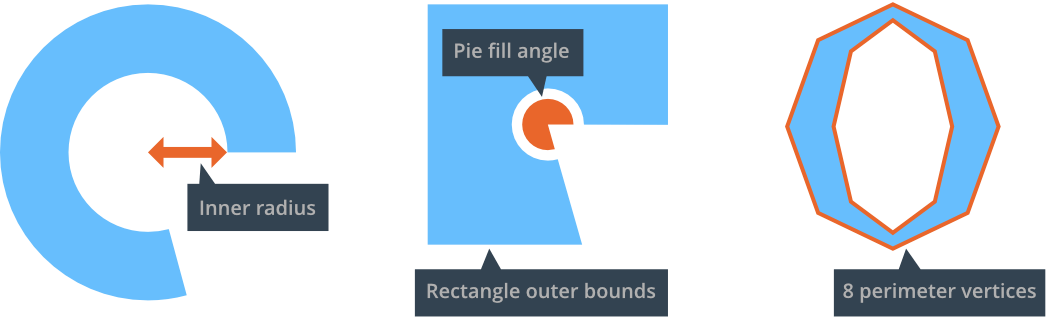
- Inner Radius
- ノードの内側の半径です。X 軸に沿った値で表します。
- Outer Bounds
- ノードの外周の形状です。
Ellipseは、ノードを外側の半径まで広げます。Rectangleは、ノードをそのバウンディングボックス(bounding box)まで広げます。
- Perimeter Vertices
- 形状の構成に使用するセグメント数です。ノードの360度の外周全体を囲むために必要な頂点数として表します。
- Pie Fill Angle
- パイの塗りつぶす範囲です。右方向を起点とし、反時計回りの角度で表します。
ノードにテクスチャを設定すると、テクスチャ画像が平面的に貼り付けられ、テクスチャの各隅はノードのバウンディングボックスの各隅に対応します。
実行時のパイノードの変更
パイノードでは、サイズ、ピボット(pivot)、色などを設定する汎用のノード操作関数をすべて使用できます。パイノード専用の関数やプロパティもいくつかあります。
local pienode = gui.get_node("my_pie_node")

-- get the outer bounds
local fill_angle = gui.get_fill_angle(pienode)

-- increase perimeter vertices
local vertices = gui.get_perimeter_vertices(pienode)
gui.set_perimeter_vertices(pienode, vertices + 1)

-- change outer bounds
gui.set_outer_bounds(pienode, gui.PIEBOUNDS_RECTANGLE)

-- animate the inner radius
gui.animate(pienode, "inner_radius", 100, gui.EASING_INOUTSINE, 2, 0, nil, gui.PLAYBACK_LOOP_PINGPONG)
Did you spot an error or do you have a suggestion? Please let us know on GitHub!
GITHUB