

AABB to frame objects with a camera
Description
An axis-aligned bounding box, or AABB, is the smallest box aligned to the world X, Y, and Z axes that contains an object. Because it is described by only two corners, min and max, it is cheap to compare, combine, and use for visibility or spatial tests.
This example spawns falling crate models with an unlit material and keeps the camera focused on all visible crates. Each crate reports its local AABB, and the script combines those bounds into one scene-sized box used for camera placement.
Press SPACE, click, or touch the screen to spawn another crate.
What You’ll Learn
- How to read the local bounds of a Model component with
model.get_aabb() - How to combine several local AABBs into one world-space bounding box
- How to position a perspective camera from the combined bounds
- How to spawn model game objects from factories
Setup
The collection contains three game objects: camera, main, and ground.
- camera
- Contains a perspective Camera component.
aabb.scriptreads its field of view and orientation, then moves it each frame so the combined bounds stay visible. - main
- Contains
aabb.scriptand two Factory components. The factories spawn/example/box1.goand/example/box2.go, which are crate model game objects using two Kenney crate glTF assets and the shared unlit material. - ground
- Contains a static 3D collision object and a simple sprite plane. The crates fall onto this surface so the tracked bounds keep changing as new crates are added.
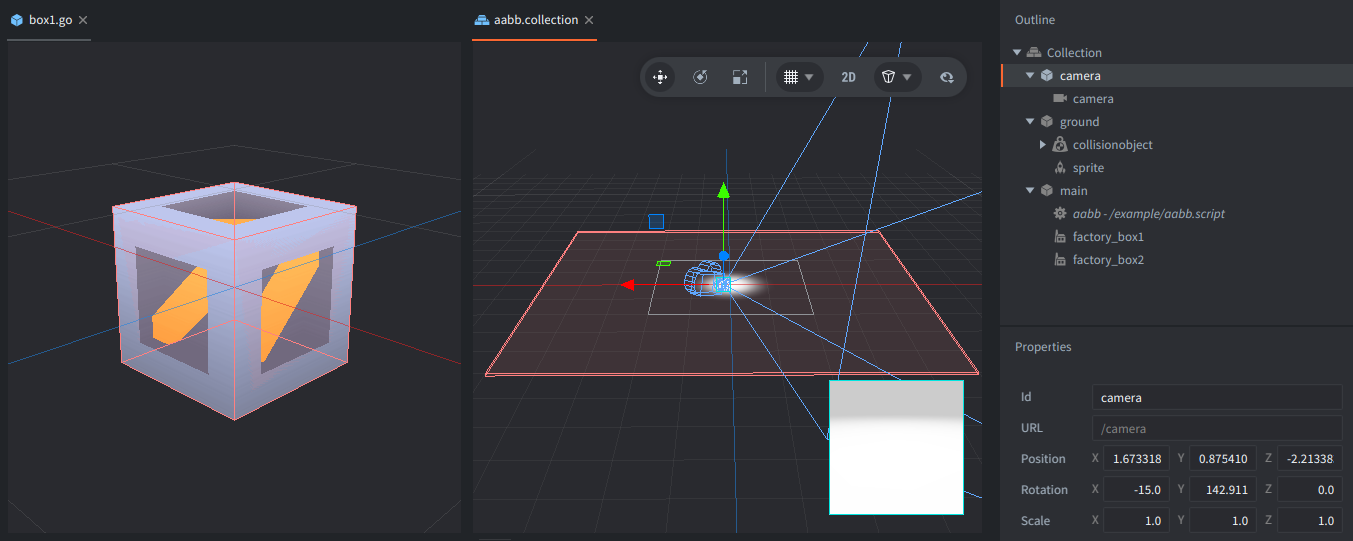
The models use an unlit material so the texture colors stay clear and even without setting up lights. For the material and shaders details, see the Unlit material example.
How It Works
model.get_aabb() returns the model’s local-space bounds. For a crate, that means the two corners of a box that encloses the crate mesh before the game object position is applied. The box stays axis-aligned, so the script can merge many crates by taking the smallest X, Y, and Z values for the combined min corner and the largest values for the combined max corner.
When a crate is spawned, the script stores its local AABB. Every frame, it adds the crate’s current game object position to that local min and max, turning the bounds into world-space values before comparing them with the accumulated scene bounds.
The combined AABB describes the full pile of crates. The script computes a center point and radius from the combined corners, smooths those values with vmath.lerp(), and places the camera far enough away for that radius to fit inside the camera field of view.
Input creates another crate through one of the two factories. The same bounds update code then expands the camera target automatically, so the full pile remains in view.
Credits
The models used in this example are from Kenney’s Prototype Kit, licensed under CC0.
Scripts
aabb.script
--
-- Dynamic bounding box - it tracks the bounding box of the objects in the scene
--

--- Create a new instance
-- @return table - the bounding box instance
local function bbox_new()
    return {
        objects = {}, -- dict for iteration
        count = 0,
        min = vmath.vector3(),
        max = vmath.vector3()
    }
end

--- Add an object to the bounding box
-- @param bbox table - the bounding box instance
-- @param obj_id hash - the object id
-- @param aabb table - the aabb of the object
local function bbox_add(bbox, obj_id, aabb)
    if not aabb then
        aabb = model.get_aabb(msg.url(nil, obj_id, "model"))
    else
        assert(types.is_vector3(aabb.min) and types.is_vector3(aabb.max), "AABB is not valid")
    end

    local entry = {
        id = obj_id,
        position = go.get_position(obj_id),
        aabb = aabb
    }
    bbox.objects[obj_id] = entry
    bbox.count = bbox.count + 1
end

--- Remove an object from the bounding box
-- @param bbox table - the bounding box instance
-- @param obj_id hash - the object id
local function bbox_remove(bbox, obj_id)
    bbox.objects[obj_id] = nil
    bbox.count = bbox.count - 1
end

--- Update the bounding box
-- @param bbox table - the bounding box instance
local function bbox_update_all(bbox)
    bbox.min = vmath.vector3()
    bbox.max = vmath.vector3()
    for _, entry in pairs(bbox.objects) do
        local pos = go.get_position(entry.id)
        entry.position = pos

        bbox.min.x = math.min(bbox.min.x, entry.aabb.min.x + pos.x)
        bbox.min.y = math.min(bbox.min.y, entry.aabb.min.y + pos.y)
        bbox.min.z = math.min(bbox.min.z, entry.aabb.min.z + pos.z)
        bbox.max.x = math.max(bbox.max.x, entry.aabb.max.x + pos.x)
        bbox.max.y = math.max(bbox.max.y, entry.aabb.max.y + pos.y)
        bbox.max.z = math.max(bbox.max.z, entry.aabb.max.z + pos.z)
    end
end

--- Compute the bounding box
-- @param bbox table - the bounding box instance
-- @return table - result with {center, min, max, radius}
local function bbox_compute(bbox)
    local center = (bbox.min + bbox.max) * 0.5
    local radius = vmath.length(bbox.max - bbox.min) * 0.5
    return {
        center = center,
        min = bbox.min,
        max = bbox.max,
        radius = radius
    }
end

--
-- Helper functions
--

--- Add a cube to the scene
-- @param self table - the script instance
-- @param x number - the x coordinate
-- @param y number - the y coordinate
-- @param z number - the z coordinate
-- @param color string - the color of the cube - "red" or "white"
local function add_cube(self, x, y, z, color)
    if self.bbox.count >= sys.get_config_int("model.max_count") then
        print("Increase `model.max_count` and `physics.max_collision_object_count` values!")
        return
    end

    local url = color == "red" and "#factory_box2" or "#factory_box1"
    local obj_id = factory.create(url, vmath.vector3(x, y, z))
    bbox_add(self.bbox, obj_id)

    go.animate(msg.url(nil, obj_id, "model"), "tint.w", go.PLAYBACK_ONCE_BACKWARD, 3, go.EASING_INQUAD, 0.5)
end

--
-- Main script
--

function init(self)
    -- Acquire input focus to receive input events
    msg.post(".", "acquire_input_focus")

    -- Get the camera default rotation
    self.camera_euler = go.get("/camera", "euler")

    -- Create a new dynamic bounding box instance
    self.bbox = bbox_new()

    -- Add some cubes to the scene at (0, 1-5, 0) coordinates
    for i = 1, 10 do
        local cube_color = i % 2 == 0 and "red" or "white"
        add_cube(self, (math.random() - 0.5) * 0.1, i / 2, (math.random() - 0.5) * 0.1, cube_color)
    end
    bbox_update_all(self.bbox)

    -- Compute the initial bounding box data
    self.view = bbox_compute(self.bbox)
end

function update(self, dt)
    bbox_update_all(self.bbox)

    -- Current bounding box data
    local current = bbox_compute(self.bbox)

    -- Animate the values for smooth camera movement
    local t = 0.05
    self.view.center = vmath.lerp(t, self.view.center, current.center)
    self.view.radius = vmath.lerp(t, self.view.radius, current.radius)

    -- Calculate camera position and rotation
    local camera_yaw = vmath.quat_rotation_y(math.rad(self.camera_euler.y))
    local camera_pitch = vmath.quat_rotation_x(math.rad(self.camera_euler.x))
    local camera_rotation = camera_yaw * camera_pitch
    local camera_zoom = 1.05 * self.view.radius / math.tan(0.5 * go.get("/camera#camera", "fov"))
    local camera_position = self.view.center + vmath.rotate(camera_rotation, vmath.vector3(0, 0, camera_zoom))
    go.set("/camera", "position", camera_position)
    go.set("/camera", "rotation", camera_rotation)

    -- Uncomment to benchmark
    -- add_cube(self, math.random(-3, 3), 10, math.random(-3, 3))
    -- add_cube(self, math.random(-3, 3), 10, math.random(-3, 3), "red")
end

function on_input(self, action_id, action)
    -- Add a cube to the scene when the mouse button / space key is pressed
    if (action_id == hash("touch") or action_id == hash("key_space")) and action.pressed then
        local colors = {"red", "white"}
        add_cube(self, (math.random() - 0.5) * 0.5, 10, (math.random() - 0.5) * 0.5, colors[math.random(1, 2)])
    end
end