

Animated Mesh - Flag
Description
This is a small Defold example showing how to create and animate textured meshes to create a waving flag. It shows how to animate an existing textured mesh without creating new buffers or using a physics simulation.
Use a mouse or touch to move the camera around.
Setup
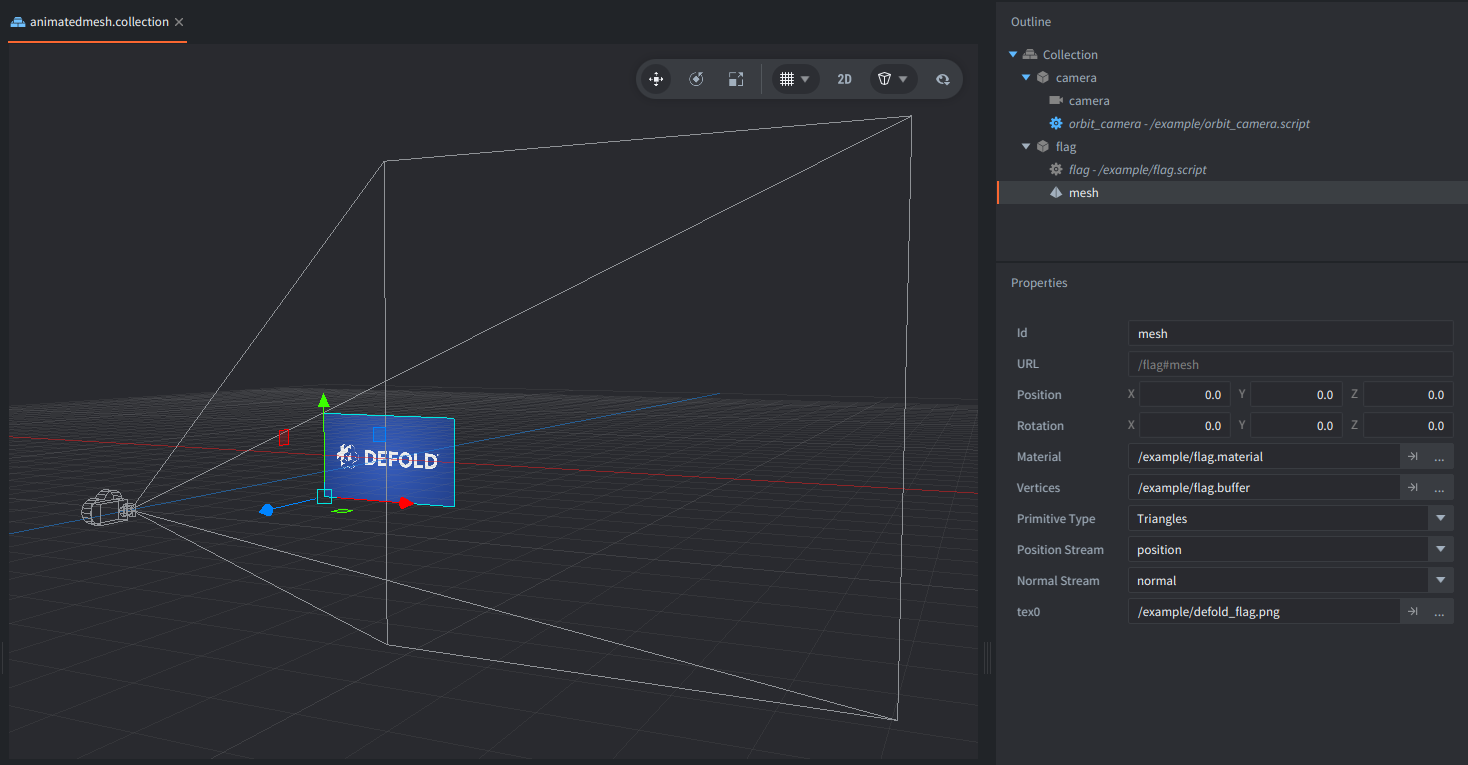
The flag mesh is defined in flag.buffer resource file and consists of a grid of triangles with position, normal, and texture coordinate streams forming a rectangle.
The texture is assigned directly to the Mesh component.
The mesh is attached in the example collection to a game object with the flag.script that controls the animation of the vertices.
Additionally, the camera with orbit_camera.script is in the collection to control the view.
How it works?
In flag.script, call to resource.get_buffer() allows us to retrieve the existing mesh buffer, and buffer.get_stream() provides access to its vertex positions and normals.
Each frame, a sine wave modifies the Z coordinates of the vertices to simulate fabric waving in the wind. The wave amplitude increases toward the free edge of the flag, keeping the opposite edge fixed.
The vertex normals are also updated to maintain smooth lighting as the mesh deforms. The data that is modified each frame is then updated in the mesh using resource.set_buffer().
A custom material and shaders (flag.vp and flag.fp) handle texture sampling and directional lighting. A perspective camera allows to see the animated mesh in 3D.
Scripts
flag.script
local WIDTH = 4.4

function init(self)
    self.time = 0

    -- Get the mesh buffer assigned to the Mesh component.
    self.resource = go.get("#mesh", "vertices")
    self.mesh = resource.get_buffer(self.resource)

    -- Get the vertex position and normal streams.
    self.positions = buffer.get_stream(self.mesh, "position")
    self.normals = buffer.get_stream(self.mesh, "normal")
end

function update(self, dt)
    self.time = self.time + dt

    -- Each vertex has three components (x, y, z).
    for i = 1, #self.positions, 3 do
        local x, y = self.positions[i], self.positions[i + 1]

        -- Increase the wave amplitude toward the free edge.
        local amount = 0.28 * x / WIDTH
        local phase = 2.8 * x + 0.25 * y - 2.3 * self.time
        local s, c = math.sin(phase), math.cos(phase)

        -- Move vertices along Z to create the waving effect.
        self.positions[i + 2] = amount * s

        -- Recalculate vertex normals to follow the deformed surface.
        local dx = 0.28 / WIDTH * s + amount * 2.8 * c
        local dy = amount * 0.25 * c
        local inv = 1 / math.sqrt(1 + dx * dx + dy * dy)

        self.normals[i] = -dx * inv
        self.normals[i + 1] = -dy * inv
        self.normals[i + 2] = inv
    end

    -- Upload the modified vertex data to the mesh.
    resource.set_buffer(self.resource, self.mesh)
end
flag.fp
#version 140

in highp vec3 var_normal;
in highp vec3 var_view_position;
in mediump vec2 var_texcoord0;
out vec4 out_fragColor;

uniform mediump sampler2D tex0;

void main()
{
    vec4 fabric = texture(tex0, var_texcoord0);
    vec3 n = normalize(var_normal);

    // Soft fill light avoids harsh, triangle-shaped shadow transitions.
    vec3 light_dir = normalize(vec3(-0.2, 0.5, 1.0));
    float diffuse = max(dot(n, light_dir), 0.0);
    float lighting = 0.55 + 0.45 * diffuse;

    // Low-gloss fabric, not shiny plastic.
    vec3 view_dir = normalize(-var_view_position);
    vec3 h = normalize(light_dir + view_dir);
    float sheen = 0.018 * pow(max(dot(n, h), 0.0), 16.0);

    out_fragColor = vec4(fabric.rgb * lighting + vec3(sheen), fabric.a);
}
flag.vp
#version 140

uniform vs_uniforms {
    mediump mat4 mtx_worldview;
    mediump mat4 mtx_proj;
    mediump mat4 mtx_normal;
};

in highp vec4 position;
in mediump vec3 normal;
in mediump vec2 texcoord0;

out highp vec3 var_normal;
out highp vec3 var_view_position;
out mediump vec2 var_texcoord0;

void main()
{
    vec4 view_position = mtx_worldview * vec4(position.xyz, 1.0);
    gl_Position = mtx_proj * view_position;
    var_view_position = view_position.xyz;
    var_normal = normalize((mtx_normal * vec4(normal, 0.0)).xyz);
    var_texcoord0 = texcoord0;
}