

Flipbook frame events - Footsteps
Description
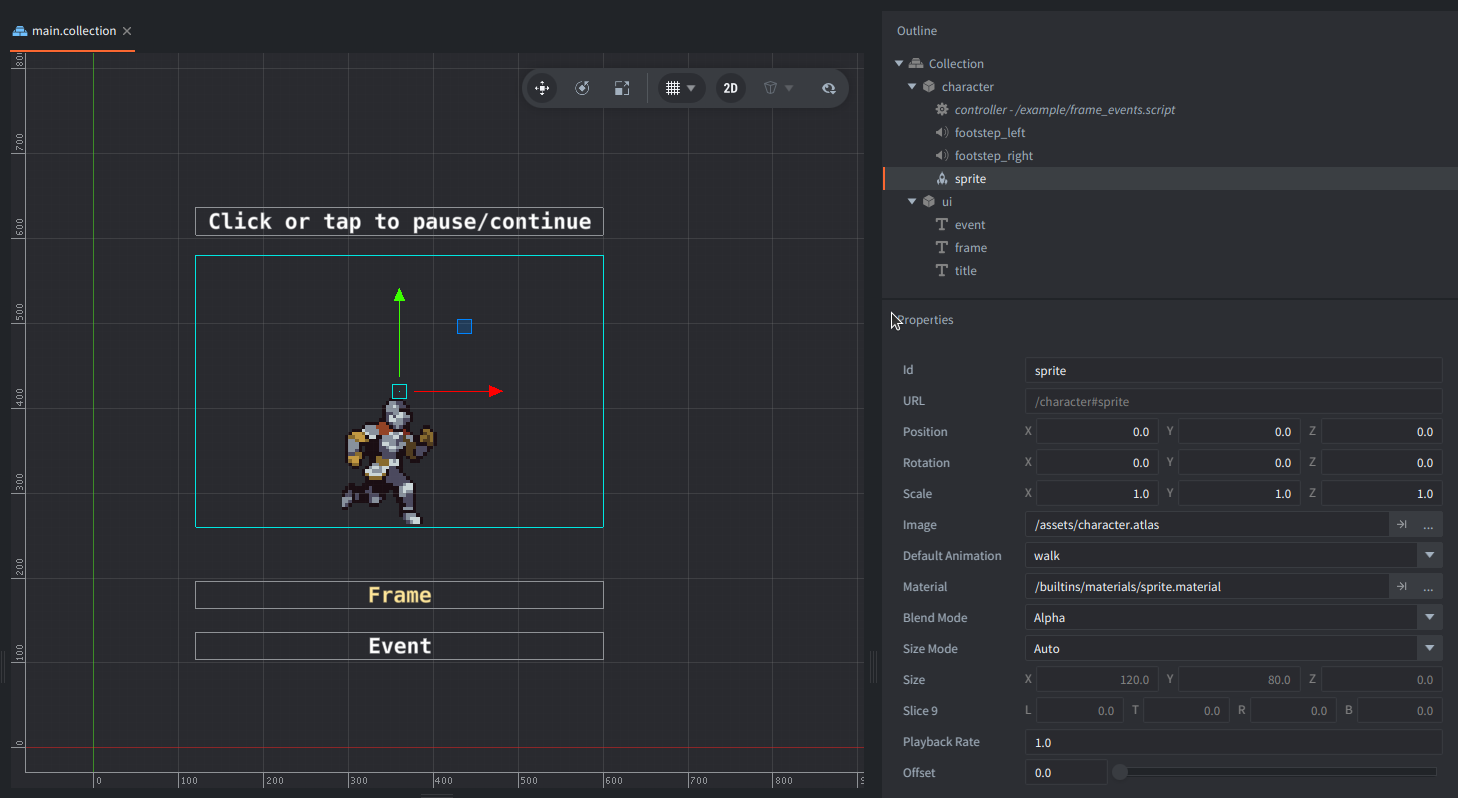
This example triggers events (label information and footstep sound) on given frames of a looping Sprite animation. Click or tap to pause and then again to resume the flipbook.
Setup
The main collection contains a character game object with:
- a sprite component that plays
walkfromcharacter.atlasby default, - a script component
frame_events.script, - 2 sound components with footstep audio
Additionally there is a game object with labels for UI information.
How It Works
FRAME_EVENTS and FRAME_EVENTS_FOOTSTEPS contains a map of selected frame numbers with assigned actions (label text and sound component URL to play).
In update(), the script converts the normalized sprite cursor and frame_count into a 1-based current frame number.
When the frame changes, the script checks the frames crossed in between, including wraparound from the last to the first frame.
If a frame has an event, a label briefly flashes to indicate the event occured and sound of a footstep is played.
The normal flipbook completion callback doesn’t fire during continuous looping.
This detects frame changes once per update.
Credits
Free Fantasy Knight by Nauris Amatnieks, License: https://aamatniekss.itch.io/fantasy-knight-free-pixelart-animated-character
Footsteps sounds (cropped) by Fission9, CC0: https://freesound.org/people/Fission9/sounds/521589/
Scripts
frame_events.script
-- Run an event when the looping flipbook passes one of these frames.
local FRAME_EVENTS = {
    [1] = "RIGHT STEP           ",
    [7] = "            LEFT STEP",
}

local FRAME_EVENTS_FOOTSTEPS = {
    [1] = "#footstep_right",
    [7] = "#footstep_left",
}

local function trigger_event(frame)
    -- Check if there is an event for the given frame
    local event = FRAME_EVENTS[frame]
    if not event then
        return
    end

    -- Set event text to the label
    go.set("ui#event", "text", event)

    -- Make the label flash shortly and then slowly disappear
    go.cancel_animations("ui#event", "color.w")
    go.set("ui#event", "color.w", 1)
    go.animate("ui#event", "color.w", go.PLAYBACK_ONCE_FORWARD, 0, go.EASING_OUTQUAD, 0.6)

    -- Play a footstep sound for a given frame event
    sound.play(FRAME_EVENTS_FOOTSTEPS[frame])
end

function init(self)
    -- Acquire input focus to respond to click/tap
    msg.post(".", "acquire_input_focus")

    -- Start the animation of the sprite
    sprite.play_flipbook("#sprite", "walk")

    -- Get the sprite count from the sprite animation
    self.frame_count = go.get("#sprite", "frame_count")

    -- Initialize data
    self.previous_frame = 1
    self.playing = true

    -- Hide the event label
    go.set("ui#event", "color.w", 0)
end

function update(self, dt)
    -- Get the position of the cursor of the sprite animation
    local cursor = go.get("#sprite", "cursor")

    -- Get the next frame number
    local frame = math.min(self.frame_count, math.floor(cursor * self.frame_count) + 1)

    -- Trigger an event only when the frame changes.
    if frame ~= self.previous_frame then
        trigger_event(frame)
        self.previous_frame = frame
        go.set("ui#frame", "text", ("FRAME %02d / %02d"):format(frame, self.frame_count))
    end
end

function on_input(self, action_id, action)
    -- Toggle playing on mouse click or touch input
    if action.pressed and action_id == hash("touch") then
        self.playing = not self.playing
        go.set("#sprite", "playback_rate", self.playing and 1 or 0)
    end
end